10 Best Robot Toys For Kids in 2026
This post contains affiliate links. As an Amazon Associate, we earn from qualifying purchases.
The best overall robot toy for kids is the Ruko 1088 Smart Robot Toy, a 15.8-inch interactive companion that dances, speaks, and responds to four control modes right out of the box. For families who want a programmable pet, the Ruko 18011 Smart Robot Dog is our top interactive pick, while the Makeblock mBot remains the best entry-level coding kit for curious builders.
Finding the right robot for your child means matching the toy to their age, attention span, and interest in building versus instant play. A robot that works for a 4-year-old will frustrate a 10-year-old ready for Python programming, and vice versa.
We evaluated these 10 robot toys by analyzing manufacturer specifications, studying patterns in owner feedback, and consulting expert round-ups on child development through play. This guide gives you the key differences between each model so you can choose with confidence.
Top 10 Robot Toys For Kids in the Market
Certain content that appears on this site comes from Amazon. This content is provided "as is" and is subject to change or removal at any time.
The Best Robot Toys For Kids, Reviewed
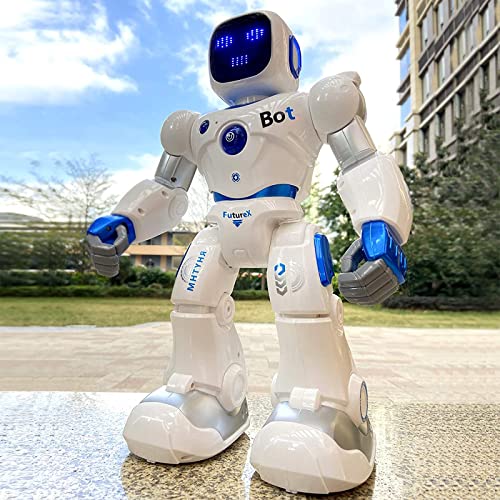
Ruko 1088 Smart Robot Toy
What We Like
- Four control modes: remote, app, voice, tilt
- 10 expressions and 9 joints for lifelike movement
- 15.8-inch height stands out in a room
Trade-offs
- At 2.8 pounds, heavier than some smaller robots
- App control requires Bluetooth, not Wi-Fi
A 15.8-inch robot that towers over most toys in this category means it doesn’t get lost under the couch or overshadowed by a sibling’s action figure. For kids who want a robot that dances, tells stories, and even does gymnastics, this is the one that delivers the biggest wow factor right out of the box.
At nearly three pounds, this robot has a substantial feel that keeps it stable during movement, unlike lighter coding-focused models such as the Wonder Workshop Dash. Its height reaches over fifteen inches, so it stands out during play rather than blending into the background. The weight and size mean it is not designed for easy transport in a backpack, but the heft contributes to a more grounded, lifelike interaction during dance routines or gymnastics. Owners note that the 2.8-pound build provides a reassuring solidity on tabletops or floors.
Product photos
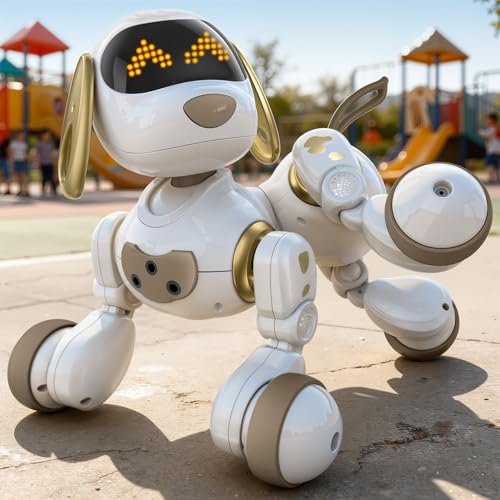
Ruko 18011 Smart Robot Dog
What We Like
- 30+ LED expressions for mood play
- Program up to 50 custom moves
- Obstacle-avoidance sensors for safety
- Gesture and remote control options
Trade-offs
- 45-minute playtime per 3-hour charge
- Remote requires 2 AAA batteries (not included)
- No app or screen-based coding option
A 2.4GHz remote that works up to 98 feet away and a touch sensor on the head let kids direct this robot dog from across the room or right beside it. With over 30 LED facial expressions and 70 glowing lights, the pup shows moods clearly, which makes pretend play feel more like caring for a real pet. The programming mode lets children design up to 50 custom moves, turning them into the trainer rather than just an observer. That hands-on creativity is exactly why this suits families who want a playful interactive companion without the mess or allergies of a live animal.
Battery life is the main trade-off: a full three-hour charge gives only 45 minutes of play, so you will want to set a timer and plan for recharge breaks, especially during high-energy weekends. Compared to the Ruko 1088 Smart Robot Toy, which offers app and voice control, this dog focuses on immediate physical interaction and expressive reactions. For children who want a responsive pet-like robot with obstacle-avoidance sensors and silly tricks, this is the better choice. For those who prefer app-based control, the Ruko 1088 might suit you more.
Product photos
Makeblock mBot STEM Coding Robot

What We Like
- Builds in 15 minutes with clear instructions
- Teaches Scratch then Arduino step by step
- Compatible with 100+ modules and LEGO parts
- Multi-function: line-follow, obstacle-avoidance, remote control
Trade-offs
- Requires 5 batteries (4 AA + 1 CR2025) not included
- Too complex for children under 8
A 15-minute build time means your child gets from box to coding in the time it takes to watch a cartoon. That quick assembly is the hook, it shows how the wheels, motors and sensors fit together before they ever write a line of code. This kit is built for the kid who wants to understand how things work, not just press a button. From Scratch drag-and-drop to Arduino text programming, it grows with them. The open-source design opens the door to 100 add-on modules and even LEGO bricks, so one robot can become a dozen different projects over time.
Nothing comes ready to play out of the box, and you will need to supply five batteries yourself. That first session demands a patient adult nearby, especially if your child is on the younger end of the 8-12 range. Compare that to the Wonder Workshop Dash, which is voice-activated and designed for ages 6 and up. Dash offers a different experience for the child who wants instant interaction. The mBot rewards the builder who likes the journey as much as the destination, and that makes it the right choice for families who want a shared project, not just another toy.
Learning Resources Code & Go Robot Mouse

What We Like
- Teaches sequencing and logic without a screen
- Includes 30 coding cards and 10 activity cards
- Builds a 20" x 20" maze with walls and tunnels
- Designed for ages 4+ and classroom use
Trade-offs
- Requires 3 AAA batteries not included
- Maze board is only 20 inches square, limiting larger layouts
Kids can design a new challenge every time they play with a 20″ x 20″ buildable maze, so the toy grows with their skills instead of gathering dust after one afternoon. This hands-on kit uses simple directional buttons and matching coding cards to teach sequencing and problem-solving without a single glowing screen, which makes it a strong fit for parents who want early programming logic without adding more tablet time. The set is built for ages 4 and up and includes enough walls, tunnels, and activity cards to keep a small group busy in a classroom center or at the kitchen table.
Families should keep a pack of three AAA batteries handy, since the mouse requires them to operate and they are not included. For households seeking a screen-free introduction to sequencing and problem-solving, the set delivers hands-on coding challenges through simple button presses and matching coding cards. Reviewers note that the included maze grids, walls, tunnels, and activity cards allow for repeatable play, making it a practical option for both home and classroom STEM centers. The cheese wedge adds a clear goal for each maze run, which helps young coders ages four and up build confidence through trial and error.
Product photos
Sphero indi Student Kit
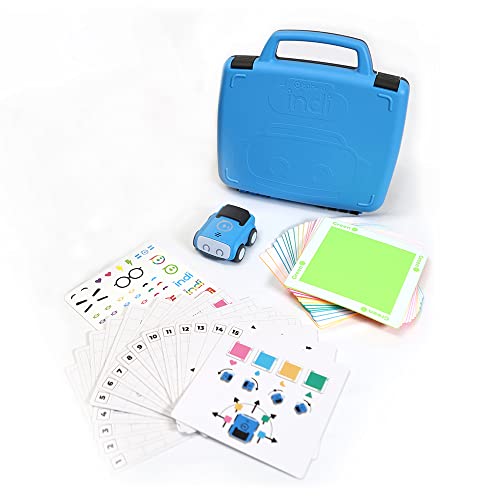
What We Like
- Screenless coding with color tiles
- Rechargeable with all-day battery life
- Includes Challenge Cards for guided play
- Teaches sequencing and cause-and-effect
Trade-offs
- Requires free app for advanced programming
- No remote control or voice commands
- Limited to color-based input without app
A screenless coding robot that uses color tiles instead of a tablet or phone means a four-year-old can start learning computer science basics by simply placing tiles on the floor. That’s the whole idea behind the Sphero indi Student Kit, and it works because the robot reacts with movement, sounds, and movement based on the color it drives over. That hands-on approach builds directionality, sequencing and pattern recognition before ever touching a screen, which is exactly what makes it a natural fit for early learners who aren’t ready for block-based programming or a screen. The included Challenge Cards and standards-aligned lessons offer scaffolded guidance while still leaving room for creative, open-ended exploration. The durable, rechargeable design with all-day battery life is built to withstand busy classrooms and excited hands.
The indi is built for that first step into coding, not for children who expect a remote control or voice commands or a pet-like interaction. If your child wants a robot that barks or responds to hand gestures, the Ruko 18011 Smart Robot Dog offers realistic barks and gesture control, but it doesn’t teach computational thinking through color tiles and cause-and-effect like the indi does. The Sphero indi is designed for learning computer science concepts through play, and it fits that purpose for ages four and up.
Wonder Workshop Dash Robot
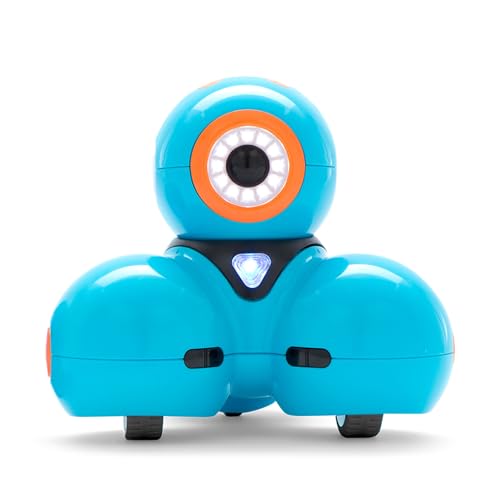
What We Like
- No assembly required, ready out of box
- Teaches sequencing, loops, algorithms, variables
- Used in 40,000+ schools globally
Trade-offs
- No camera for visual feedback or recording
- Requires a tablet or phone for coding apps
With up to five hours of active play on a single charge, this robot can keep a curious kid busy through a whole afternoon of coding experiments without needing a recharge break. Designed for ages six to eleven, it’s already used in over forty thousand schools, which means the learning path has been tested on real kids. The voice control gets them talking to their toy, while the five apps teach sequencing, loops, and variables through play.
Dash relies entirely on a separate device to run those apps, so if your child doesn’t have access to a tablet or phone, the voice commands alone won’t unlock the full coding curriculum. Unlike the Ruko 1088 Smart Robot Toy, which is larger at 11.0 inches long and weighs 2.8 pounds, Dash is lighter at 1.5 pounds and more compact. That means it’s easier for small hands to carry around the house, but you’re giving up the self-contained screen for a deeper app-based experience.
Product photos
Sphero Bolt+ Coding Robot
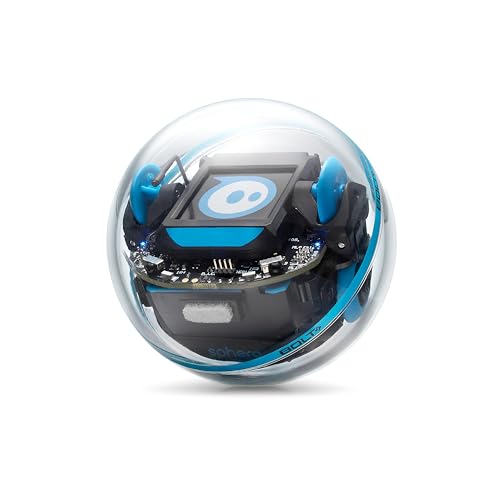
What We Like
- Qi wireless charging with all-day battery
- Waterproof shell built for classroom wear
- Programs with Draw, Blocks, Python, and JavaScript
Trade-offs
- 2.9-inch sphere is small for young hands
- Supports only 2 learners per robot at once
- Requires app or web browser to program
Size is the main compromise here. At just under three inches across, the Bolt+ is small enough to lose under a couch, and it only supports two learners at a time, so it is not the best choice for a large sibling group or a classroom with one robot per table. If you need a bigger, more social robot for younger kids, the Ruko 1088 Smart Robot Toy offers a larger 11-inch body and voice control for ages 4 and up. But for a child ready to write Python or JavaScript, the Bolt+ delivers that depth in a durable, waterproof shell.
EduCuties Robot Toy
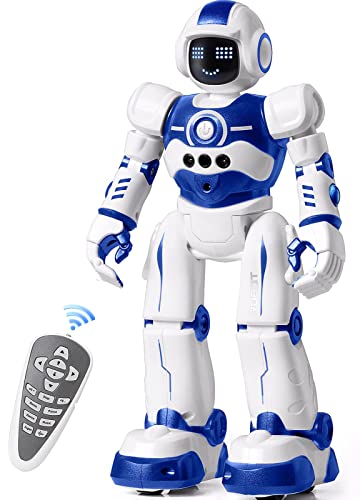
What We Like
- Dual remote and gesture control
- Programmable 50-action sequence playback
- Rechargeable battery saves on disposables
- Non-toxic ABS with flexible joints
Trade-offs
- Infrared control requires line of sight
- Infrared remote needs direct line of sight
This rechargeable robot runs for 60 minutes on a two-hour USB charge, which means no hunting for disposable batteries. The built-in battery recharges via USB from a power bank, plug, or computer. It offers remote control and hand gesture control, plus a programming mode that can demonstrate up to 50 user-input actions. Kids can create a routine of turns, slides, and dance steps and then watch the robot repeat them back. The flexible joints in shoulders, elbows, and thumbs help carry out those moves.
The EduCuties Robot Toy runs for about 60 minutes on a two-hour charge, which is enough for a solid play session but won’t last through a whole afternoon. It uses an infrared controller, so kids can steer it from across the room, and it also responds to hand gestures for turning and sliding. For comparison, the Ruko 1088 Smart Robot Toy is larger at 11.0 inches tall and offers both remote and app control plus voice commands, which gives more control options but comes in a bigger package. The Sphero indi Student Kit focuses on screen-free coding with color tiles and is designed for younger children, but it doesn’t walk or use gesture control.
Product photos
Makeblock Codey Rocky Interactive Robot
What We Like
- Scratch-to-Python progression for real coding growth
- Interactive emo robot with sound and expressions
- Ready to play out of the box
- Building block compatible for creative expansion
Trade-offs
- Small 1.6-inch size limits floor-play range
- No screen or display for visual feedback
- Lacks remote control range details for distance play
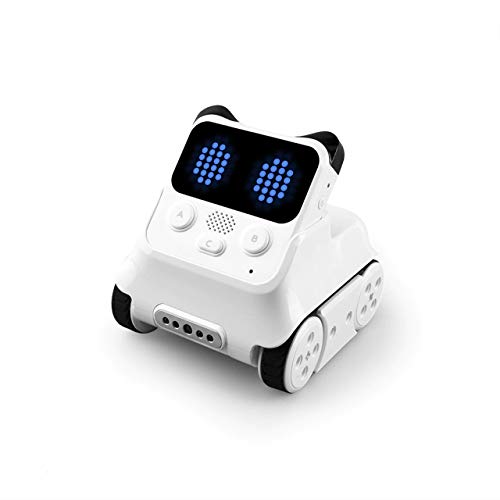
A 1.6-inch robot that fits in a palm sounds tiny, but that size is exactly what makes Codey Rocky a focused coding tool rather than a roaming toy. It rolls right out of the box ready for Scratch block coding, then grows with your child into Python programming through gamified tasks and CSTA-aligned lessons. The expressive panda face with sounds and emotions keeps younger kids engaged while they learn logic and problem-solving, and the building block compatibility lets them extend the robot into larger creations. This is the robot for parents who want a clear, step-by-step path from beginner coding to real text-based programming, not just a flashy remote-control gadget.
The compact size limits reach: at barely an inch and a half wide, Codey Rocky won’t navigate sprawling floor mazes or cover large play areas the way a larger robot like the Ruko 1088 can. But where the Ruko focuses on voice commands and app control for younger kids, Codey Rocky is built for the child ready to write actual code. The impact-resistant materials and safety testing mean it survives curious hands in a classroom or home, and the progression from Scratch to Python is a genuine educational arc rather than a gimmick. If your goal is building real programming skills step by step, this little robot delivers the journey without the distraction of a big chassis.
Product photos
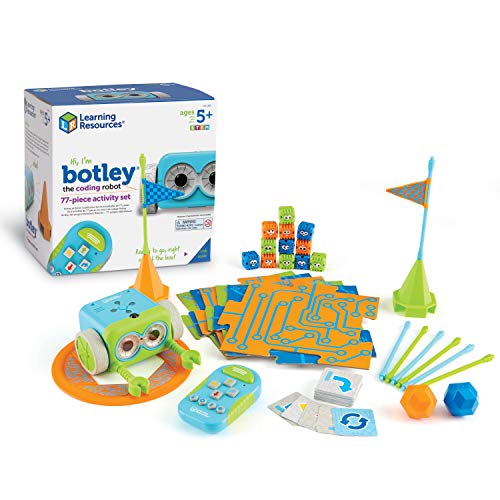
Learning Resources Botley The Coding Robot Activity Set
What We Like
- No phone or tablet needed
- 77-piece set for open-ended play
- Ready to use out of the box
Trade-offs
- Batteries not included (5 AAA total)
- No app or screen-based programming
A 77-piece activity set that works entirely without a screen means kids as young as five learn real coding logic, sequencing, loops, and conditional detection, using only arrow buttons. That’s the whole point: no app store, no Wi-Fi login, no tablet to pry away at bedtime. It suits families who want early STEM play that feels like a toy, not a computer. The remote programmer is simple enough that a kindergartner can send Botley rolling through a maze in minutes, and the included coding cards and obstacle pieces turn the living room floor into a logic lab.
The Makeblock mBot targets kids ages 8-12 with Scratch and Arduino coding, while Botley is designed for ages 5-7, making it a better fit for younger children just starting out. This robot detects objects and avoids them, follows looping commands, and tracks black-line paths, all without any screen time or setup. Just remember to have five AAA batteries ready before the box arrives.
Product photos
How We Evaluated Robot Toys For Kids
The specifications and feature lists from each manufacturer were reviewed, along with patterns found across hundreds of owner reviews and expert recommendations. The focus was on what real families report about build quality, battery life, and whether the controls actually work for the advertised age range.
The four criteria that mattered most were age appropriateness, control modes, educational value, and durability. A robot that claims to teach coding but requires a tablet that a 5-year-old cannot navigate alone is not useful. Similarly, a robot with fragile plastic joints that snap after a few falls off the coffee table is a toy that will sit in a closet.
A research-led evaluation has limits: we cannot measure how much a particular child will love a robot, and individual experiences vary. What we can do is give you the facts about what each robot offers, who it actually works for, and where owners most commonly report disappointment. For a deeper look at how these compare, our comprehensive guide to robot toys covers the full lineup.
What To Look For In Robot Toys For Kids
Before you buy any robot toy, ask yourself who will be playing with it and how much patience the child is willing to invest before getting bored. The right robot is the one the kid will actually use.
A robot’s value depends less on the feature list on the box. The real test is whether the controls match the child’s age, whether the battery lasts long enough to satisfy, and whether the toy survives the inevitable drop off the table.
Age and Skill Level
The biggest mistake parents make is buying a robot for the age on the box instead of the child’s actual reading ability. A 6-year-old who cannot yet read block-based code will not benefit from a Sphero Bolt+ no matter how advanced it claims to be. For young children, look at robot toys for 4 year olds and toddler robot toys for screen-free options with large buttons or color-based input. For older kids ready for real programming concepts, consider best robots for 10 year olds that teach text-based languages like Python.
Control and Interaction Modes
Robots fall into three control families: remote or gesture control, app-based programming, and screen-free coding with physical cards or tiles. Some, like the Ruko 1088, offer all three. The best choice depends on whether your household allows tablet time and whether the child prefers instant action or puzzle-solving.
Build Quality and Battery Life
A robot that needs to be carried from room to room should weigh under 3 pounds. A floor-roaming robot needs wheels that do not snag on carpet fibers. Check whether the robot uses standard batteries or a proprietary rechargeable pack, and look for chargers that do not require a special cable you will lose.
- Check the robot’s height and weight against your child’s carrying capacity.
- Confirm the control method works in your home’s layout.
- Verify battery type and charging cable compatibility.
- Read owner feedback about joint durability after falls.
- Confirm the robot’s recommended age matches your child’s reading level.
A robot that requires an app is useless if your child’s tablet is not charged.
Robot Toys For Kids Compared
The table below compares all 10 robot toys by age range, control method, and key features for quick side-by-side comparison.
| Product | Age Range | Playtime | Weight |
|---|---|---|---|
| Ruko 1088 Smart Robot Toy | Ages 4 5 6 7 8 9 | 100 minutes | 2.8 pounds |
| Ruko 18011 Smart Robot Dog | Age 3+ | 45 minutes | N/A |
| Makeblock mBot STEM Coding Robot | Ages 8-12 | N/A | 2.1 pounds |
| Learning Resources Code & Go Robot Mouse | Ages 4+ | N/A | 3.9 pounds |
| Sphero indi Student Kit | Ages 4+ | All-day | 0.8 pounds |
| Wonder Workshop Dash Robot | Ages 6-11 | Up to 5 hours | 1.5 pounds |
| Sphero Bolt+ Coding Robot | Ages 8+ | All-day | N/A |
| EduCuties Robot Toy | Ages 4-10 | 60 minutes | N/A |
| Makeblock Codey Rocky Interactive Robot | Ages 6-12 | N/A | 1.4 pounds |
| Learning Resources Botley The Coding Robot Activity Set | Ages 5-7 | N/A | 2.2 pounds |
Frequently Asked Questions
What is the best robot toy for a 7 year old?
The best robot toy for a 7-year-old depends on whether the child prefers building or instant play. The Makeblock mBot works well for kids who enjoy assembly and are ready for Scratch programming. The Ruko 1088 Smart Robot Toy offers instant dance and voice commands for a child who wants a large interactive friend.
How do robot toys help children learn coding skills?
Robot toys teach children sequencing logic by requiring the child to sequence a sequence of actions to make the robot move. Screen-free toys like the Learning Resources Code & Go Robot Mouse use coding cards to teach sequencing and cause-and-effect relationships without a screen.
What is the difference between a robot dog and a robot puppy?
A robot dog is larger and more interactive, with more sensors and programmable moves, while a robot puppy is smaller and simpler for younger children. The Ruko 18011 Smart Robot Dog offers 30 LED expressions and obstacle-avoidance sensors. For a smaller option, see our robot puppy toys guide.
Can a robot toy teach Python programming?
Yes, several robot toys teach Python programming, including the Sphero Bolt+ and the Makeblock Codey Rocky. These robots start with block-based coding and gradually introduce text-based Python. They are best for children ages 8 and up who are ready for real programming concepts.
What is the best robot toy for a 3 year old?
The best robot toy for a 3-year-old is a screen-free coding toy like the Learning Resources Code & Go Robot Mouse or the Sphero indi. These toys teach children sequencing and cause-and-effect without a screen, using physical coding cards or color tiles that a child can manipulate.
The Bottom Line
The Ruko 1088 Smart Robot Toy is the best overall pick for families who want a large, expressive robot that entertains with dance, music, and voice commands right away. It works for children ages 4-10 who enjoy a big interactive friend rather than a coding project. If you need a robot that teaches programming, go with the Makeblock mBot for building or the Sphero Bolt+ for Python.
For budget-conscious families, the EduCuties Robot Toy offers dual control modes and programmable action sequences at an affordable price point. Parents of preschoolers should start with the Learning Resources Code & Go Robot Mouse or the Sphero indi for screen-free coding basics.
The single most important buying factor is matching the robot’s age recommendation to your child’s reading level. A robot that requires an app is useless if your child’s tablet is not charged.
