
10 Best Robot Toys For 10 Year Olds in 2026
This post contains affiliate links. As an Amazon Associate, we earn from qualifying purchases.
The Makeblock mBot STEM Coding Robot is the best overall robot toy for 10 year olds because it builds in just 15 minutes and teaches real coding from Scratch to Arduino. For kids who love LEGO and mechanics, the Klutz Lego Gear Bots STEM Kit offers a fantastic hands-on building experience. Meanwhile, the Thames & Kosmos Coding Chameleon is our top choice for a screen-free interactive pet robot that responds to touch and color.
At age 10, kids are ready for more complex challenges, but they still need toys that feel like play, not homework. The best robot toys for this age group balance genuine STEM learning with the kind of open-ended fun that keeps a child coming back to the coffee table after dinner.
We built this guide by studying manufacturer specifications, expert round-ups, and patterns in owner feedback across dozens of kits. Our goal is to help you match a robot to your child’s interests, whether they love building, coding, battling, or just having a robot buddy.
Top 10 Robot Toys For 10 Year Olds in the Market
Certain content that appears on this site comes from Amazon. This content is provided "as is" and is subject to change or removal at any time.
The Best Robot Toys For 10 Year Olds, Reviewed
Makeblock mBot STEM Coding Robot

What We Like
- Builds in 15 minutes
- Teaches Scratch to Arduino coding
- Open-source with 100+ add-on modules
- Compatible with LEGO parts
Trade-offs
- Remote needs CR2025 battery (not included)
- Robot needs 4 AA batteries (not included)
- No pre-assembled option for impatient kids
Fifteen minutes of assembly gets you a working robot that teaches real coding, not just button-mashing. The build time is short enough for kids ages 8-12 to stay engaged while learning how electronics and robotics components fit together. It starts with Scratch’s drag-and-drop blocks and graduates to Arduino text coding, so the same toy grows with them from casual play to actual programming logic. The open-source design is compatible with over 100 electronic modules and 500 parts from the Makeblock platform, plus LEGO bricks, so the robot can be expanded into many different projects.
The catch is battery hunger. The robot needs four AA cells, and the remote needs a separate CR2025, none of which come in the box. That first play session often ends with a trip to the kitchen drawer for spares. The mBot’s upgrade path from Scratch to Arduino and its wide compatibility with add-on parts make it a flexible learning tool for a kid interested in coding. Best for families who want a build-it-yourself robot that teaches real programming skills and can be expanded over years. Not ideal for kids who hate following assembly steps or parents who forget to buy batteries.
Klutz Lego Gear Bots STEM Kit
What We Like
- Includes all LEGO elements needed
- Teaches axles, cams, and cranks
- 64-page book with step-by-step instructions
Trade-offs
- No coding or electronics for tech-focused kids
- Papercraft pieces are not durable for repeated play.
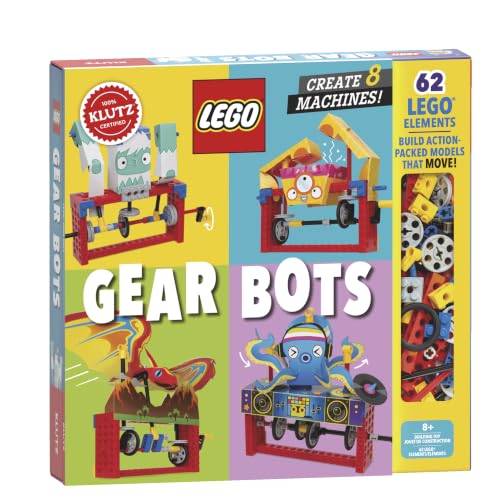
Eight physics-driven kinetic creatures from one kit means a child gets a fresh build each time without needing extra parts. The kit includes LEGO Technic bricks and papercraft, and the 64-page book covers axles, cams, cranks, and engineering in everyday machines with step-by-step instructions. For a child who enjoys hands-on building, this kit turns mechanical principles into a tangible project. The book guides each build, so a child can follow along and complete each creature.
The trade-off is that this kit focuses entirely on mechanical engineering, not coding or electronics. If your child wants a programmable robot, the Makeblock mBot offers a coding path instead. But for the kid who prefers building with bricks and paper over screens, the Klutz kit delivers a self-contained experience. No batteries, no apps, no downloads, just bricks and paper.
Thames & Kosmos Coding Chameleon

What We Like
- Screen-free coding with physical action cards
- Three distinct play modes for variety
- 48-page manual teaches bionic engineering
- Responds to touch, color, and gestures
Trade-offs
- Requires adult help for ages 8-11
- Duracell batteries recommended but not included
- At 15 inches, needs tabletop space to move
A 15-inch-long chameleon that fires its tongue, changes color, and responds to your gestures sounds like a pet from a sci-fi cartoon, but this kit makes it real without needing a single screen. You build the model from the ground up, then program it using physical color cards that the robot reads through its built-in sensors. That hands-on construction combined with screen-free coding is exactly why this suits a builder who wants more than a pre-programmed toy. They get to understand how the robot thinks while watching it camouflage or react to a touch.
The manual is 48 pages long and guides kids through assembly, but most 8-year-olds will need help from an adult. The Coding Chameleon uses physical colored action cards to program the robot, so no screens, devices, or software are required. Compared to the Makeblock mBot, which teaches coding with Scratch and Arduino, this set offers a more tactile, self-contained experience that works anywhere.
Thames & Kosmos Hydraulic Boxing Bots
What We Like
- Builds two complete boxing robots
- Teaches hydraulics, gears, and pistons
- Includes scoreboard for head-to-head play
- Independent upper and lower body movement
Trade-offs
- Requires water for hydraulic system
- Assembly needed before any play begins
- Only one activity: robot boxing
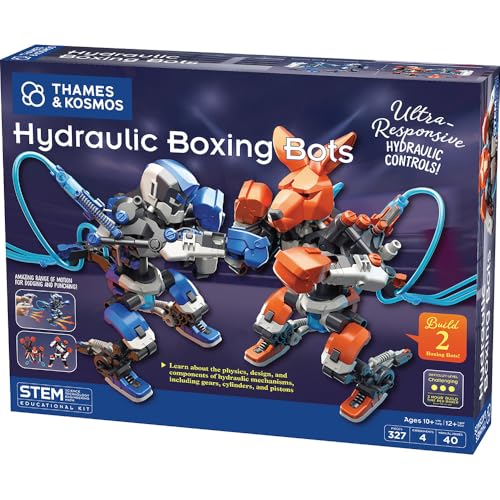
Two complete boxing robots powered by water hydraulics mean this kit delivers a genuine head-to-head battle experience, not just a solo build. The upper and lower bodies move independently, so the robots can dodge, jab, and punch with accuracy. The included scoreboard lets you challenge a friend to a hydraulic robot battle, turning a building project into a two-player competition.
This is a pure build-and-battle kit with a single focus. Unlike the Makeblock mBot STEM Coding Robot, which teaches coding with Scratch and Arduino, the Hydraulic Boxing Bots commit entirely to one activity. Once the robots are assembled and the water is added, that’s the game. But for a 10-year-old who loves engineering and a good-natured competition, this kit delivers exactly what it promises.
Product photos
Sillbird STEM 5-in-1 Robot Kit
What We Like
- Five different buildable models in one kit
- Dual control via app and remote
- Clear step-by-step instructions for independent building
- Rechargeable battery for extended play
Trade-offs
- 488 pieces can overwhelm a less patient builder
- Only one model can be built at a time
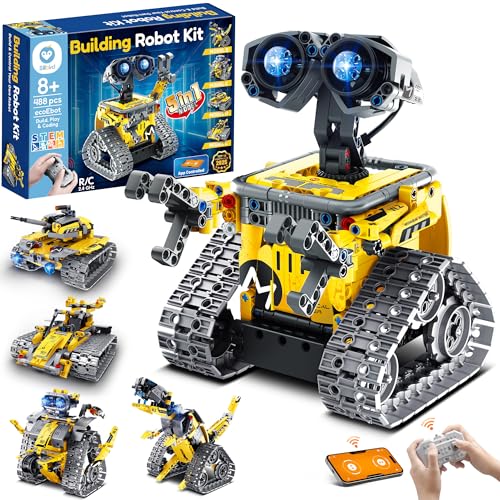
With 488 pieces that recombine into five different models, robot, dinosaur, car, tank, and more, this kit gives a ten-year-old multiple projects from a single box. The dual control modes (app via Bluetooth and a standard remote) let them start with simple driving and later explore basic programming, so the toy doesn’t get boring after the first model is finished.
Young builders who need extra help staying on task may want an adult close at hand when tackling the more challenging models. The rechargeable battery delivers up to 40 minutes of play per charge, so a long afternoon of building and coding will require a break to plug it back in. That runtime is similar to other kits in this category, like the OKK Robot Building Kit, which also uses a rechargeable battery. The 488-piece set includes clear, step-by-step instructions that let kids work independently or alongside family members, making the assembly process a shared activity rather than a solitary chore.
Wesfuner 30-in-1 Solar Robot Kit

What We Like
- 30 build options in one box
- Solar or battery power for indoor play
- 243-piece set for extended building
- Teaches renewable energy concepts
Trade-offs
- AAA battery not included for indoor use
- No coding or remote control features
This kit keeps a 10-year-old building something new long after a single-model set would collect dust, with 30 different robot designs. Powered by a solar panel or a AAA battery (not included), it works both outside in sunlight and indoors on a cloudy day, so the learning doesn’t stop when the weather changes. That flexibility means kids can explore renewable energy concepts through hands-on play.
This is purely a building and solar-play kit, with no coding, remote control, or app interaction. For a 10-year-old who enjoys following instructions and tinkering, the 243 pieces offer plenty of challenge. But if your child craves programmable movement or digital feedback, the Wesfuner’s mechanical-only approach will feel limited.
Product photos
OKK Robot Building Kit 635 Pieces
What We Like
- 635-piece snap-together build
- Remote and app control modes
- Rechargeable battery included
- Adjustable shoulders, arms, eyebrows
Trade-offs
- Remote needs 2 AAA batteries (not included)
- At 2.2 lb, heavier than most building kits
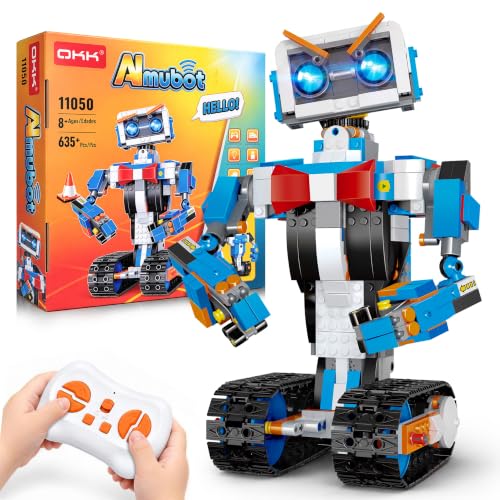
A 635-piece count means a full afternoon of focused building for a ten-year-old before they ever turn it on. It has real mechanical complexity: tracks that drive, a head that moves, and shoulders, arms, elbows, and eyebrows you can pose manually for each mission. The included rechargeable lithium battery charges via USB, so no hunting for disposables. The 2.4 GHz remote reaches up to 65 feet in open areas, which lets kids roam the living room or driveway without losing signal under those conditions. It suits the builder who wants a substantial project and a working robot that responds to both a controller and a companion app.
This set is big and involved. At 2.2 pounds it has real heft, and the remote requires two AAA batteries you have to supply yourself, a small annoyance when the robot itself charges so neatly. For a ten-year-old who prefers instant action, the Makeblock mBot is smaller and gets them coding faster. But for the kid who loves construction, follows illustrated guides step by step, and wants a robot they can pose, drive, and program across five app modes, this is the most rewarding build in the guide.
Makeblock mBot2 Rover Robotics Kit

What We Like
- All-terrain drive for outdoor play
- Two-stage build from simple to complex
- Customizable emo expression feature
- Dances, plays music, and games
Trade-offs
- Large 21-inch size needs storage space
- Two builds mean more assembly time
- Heavier than typical coding robots
A 21-inch long chassis with an all-terrain drive system means this robot can roll over grass, gravel, and bumpy backyard ground without getting stuck. Kids who enjoy taking their gadgets outside will appreciate that it can handle real-world terrain while still offering the coding and building challenges of a STEM kit. The two-stage assembly starts with the simpler mBot2 and then moves to the more complex Rover construction, so a builder can build confidence before tackling the bigger build.
At 21 inches long, this robot is significantly larger than the 7.2-inch Wonder Workshop Dash, so it will need a dedicated storage space between play sessions. The kit offers two build stages, starting with the simpler mBot2 and advancing to the Rover. That builds problem-solving skills step by step, but also means more time with a screwdriver before the robot can dance or play music. For a child who enjoys building and wants a robot that can handle outdoor terrain, this Rover fits the bill.
Product photos
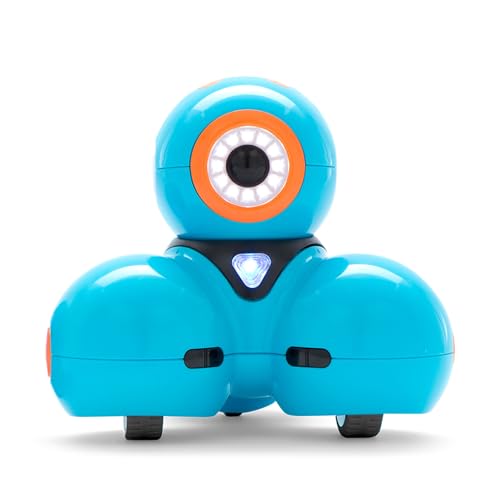
Wonder Workshop Dash Robot
What We Like
- No assembly required, ready out of box
- Teaches sequencing, loops, algorithms, variables
- Used in 40,000+ schools globally
Trade-offs
- No camera included for visual feedback
- Requires app download for full functionality
- Building brick connectors limited to two pieces
The Dash Robot requires no assembly, so a 10-year-old can open the box and start coding within minutes, no screwdrivers or frustration. With five apps that teach sequencing, loops, and variables through singing, dancing, and obstacle navigation, it turns abstract concepts into immediate reactions. The robot responds to voice commands, and the battery supports up to 5 hours of active play, keeping the learning going through a long afternoon.
Dash relies entirely on its apps; without a tablet or phone, it’s a silent paperweight. The robot does not contain a camera, so it cannot see or interact with visual cues. Compared to the Makeblock mBot, which requires assembly and teaches hardware alongside code, Dash is the better choice for a child who wants instant results and a playful introduction to programming logic rather than a construction project.
Product photos
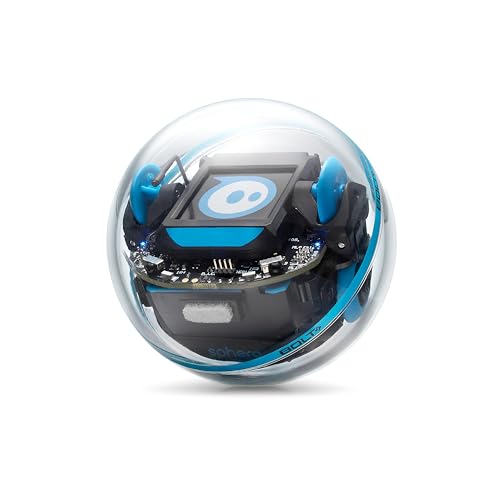
Sphero Bolt+ Coding Robot
What We Like
- Teaches Blocks, Python, and JavaScript
- Animated LCD for code output and data
- Qi wireless charging with all-day battery
- Durable, waterproof shell for classroom use
Trade-offs
- Supports only 2 learners per robot
- Requires app and device to program
- Small 2.9-inch size limits hands-on building
Programming with the Sphero Bolt+ starts with drag-and-drop blocks and can advance all the way to Python and JavaScript, so a child can grow their skills without needing a new device. The animated LCD screen lets you code animations, messages, and real-time data, which makes abstract concepts visible as the robot moves across the floor. It supports up to two learners at a time, making it ideal for pair programming in a classroom or at home. The durable, waterproof shell and Qi wireless charging are built for repeated use, and the all-day battery keeps lessons running without constant plugging in.
This is a coding tool, not a building kit. At just 2.9 inches across, the Bolt+ is a compact sphere you program and drive. If your child enjoys assembling parts like the Makeblock mBot, they might miss hands-on construction. Also, one robot supports only two learners at a time, so it works best for focused pair work rather than a large group. But for a child ready to write code and see results on a screen they control, the Bolt+ offers a deep programming experience.
Product photos
How We Evaluated Robot Toys For 10 Year Olds
Our evaluation is research-based. We pored over manufacturer documentation, studied expert round-ups from toy and STEM education sources, and looked for consistent patterns in what owners report about assembly difficulty, durability, and long-term engagement. No product was tested in a lab, we rely on the data available to any careful shopper.
The four criteria that mattered most were educational depth, build quality, replay value, and age fit. A robot that teaches real coding languages like Scratch or Python scored higher than one with a simple remote. We favored kits with solid construction that can survive a drop from a desk. Replay value came from multiple build options, expandability, or open-ended play modes. And every robot had to be appropriate for a typical 10-year-old’s attention span and fine motor skills.
A research-led evaluation has limits. Owner feedback can be subjective, and a kit that delights one child may frustrate another. We flag trade-offs honestly so you can judge what fits your child’s temperament. For more context, our robot toy reviews cover a wider range of ages and styles.
What To Look For In Robot Toys For 10 Year Olds
A 10-year-old needs a robot that challenges without overwhelming. Look for kits that match your child’s tolerance for assembly, their interest in coding versus building, and the kind of play they enjoy most, solo tinkering or head-to-head competition.
Choose a robot that matches your child’s preferred play style: building, coding, battling, or pet care. The best kit is the one they will actually use, not the one with the longest feature list.
Build Time and Assembly Difficulty
Some kids love the process of snapping together gears and motors for an hour. Others want a robot that works in under 15 minutes. The Makeblock mBot takes about 15 minutes to build, while the OKK Robot Building Kit‘s 635 pieces can occupy a patient builder for an entire afternoon. If your child gets frustrated easily, look for kits with clear step-by-step instructions and minimal fiddly parts. If they thrive on complexity, a larger piece count offers more satisfaction.
Coding Depth and Screen Time
Robot toys for 10 year olds range from completely screen-free to app-dependent. The Thames & Kosmos Coding Chameleon uses physical action cards for coding, no screen required. The Sphero Bolt+ teaches Blocks, Python, and JavaScript on a tablet or phone. Consider your family’s screen time rules and whether your child is ready for text-based programming. Our guide to coding and robotics kits can help you match coding depth to your child’s experience level.
Replay Value and Expandability
A robot that does one thing well is fine, but a kit that grows with the child offers better value. The Makeblock mBot is open-source with over 100 add-on modules and works with LEGO bricks. The Sillbird 5-in-1 kit lets a child rebuild the same pieces into five different robots. Check whether the manufacturer sells expansion packs or if the robot works with common toys like LEGO.
- Check the battery requirements: many kits need AA or CR2025 batteries not included in the box.
- Look for rechargeable battery options to save money and waste over time.
- Confirm that replacement parts or expansion kits are available for purchase.
- Read the recommended age range carefully, some “ages 8+” kits are better for 10 and up.
A robot that can be rebuilt, recoded, or expanded will stay interesting long after the first model is complete.
Robot Toys For 10 Year Olds Compared
The table below compares the top robot toys for 10 year olds across key features like build time, coding depth, and play style to help you narrow your choice.
| Product | Age Range | Weight | Programming |
|---|---|---|---|
| Makeblock mBot STEM Coding Robot | 8-12 years | 2.1 pounds | Scratch & Arduino |
| Klutz Lego Gear Bots STEM Kit | 8-12 years | 1.0 pounds | N/A |
| Thames & Kosmos Coding Chameleon | 8+ | 1.5 pounds | N/A |
| Thames & Kosmos Hydraulic Boxing Bots | 10+ | 1.8 pounds | N/A |
| Sillbird STEM 5-in-1 Robot Kit | 8-12 years | 1.8 pounds | App (Bluetooth) & Remote |
| Wesfuner 30-in-1 Solar Robot Kit | 8-13 years | 1.2 pounds | N/A |
| OKK Robot Building Kit 635 Pieces | 8-14 | 2.2 pounds | Remote + App |
| Makeblock mBot2 Rover Robotics Kit | Ages 8-12 | N/A | Remote Control Coding |
| Wonder Workshop Dash Robot | 6 and Older | 1.5 pounds | Blockly, Wonder, Path |
| Sphero Bolt+ Coding Robot | Ages 8+ | N/A | Blocks, Python, JavaScript |
Frequently Asked Questions
What is the best robot toy for a 10 year old who loves building?
The Klutz Lego Gear Bots STEM Kit is the best choice for a hands-on builder. It teaches axles, cams, and cranks using actual LEGO elements and includes a 64-page instruction book. There is no coding or electronics, so it is ideal for a child who wants to understand mechanical movement.
Can a 10 year old learn real coding from a robot toy?
Yes. The Sphero Bolt+ teaches Blocks, Python, and JavaScript, which are real programming languages used in schools and industry. The Makeblock mBot starts with Scratch, a visual coding language, and progresses to Arduino text-based coding. Both provide a genuine coding education through play.
Are robot toys for 10 year olds difficult to assemble?
It depends on the kit. Some, like the Wonder Workshop Dash Robot, come ready to play out of the box with no assembly required. Others, like the OKK Robot Building Kit with 635 pieces, take significant time and patience. Most kits fall in between, with build times of about 15 minutes to an hour.
What is the best robot toy for two 10 year olds to play together?
The Thames & Kosmos Hydraulic Boxing Bots is designed for two-player head-to-head battles. It builds two complete boxing robots and includes a scoreboard. The robots use a water-powered hydraulic system, which adds a science lesson to the competition.
Do robot toys for 10 year olds require a smartphone or tablet?
Not all of them. The Thames & Kosmos Coding Chameleon uses physical action cards and responds to touch and color without any app. The Wesfuner Solar Robot Kit runs on solar power or batteries with no screen needed. Many app-controlled robots also offer a basic remote control mode.
The Bottom Line
The Makeblock mBot STEM Coding Robot is the best overall choice for most 10 year olds. It builds quickly, teaches real coding from Scratch to Arduino, and grows with the child through open-source expandability and LEGO compatibility. It is ideal for a kid who enjoys building and wants a robot that can do more over time.
If your child prefers building without screens, the Klutz Lego Gear Bots STEM Kit delivers pure mechanical engineering fun. For a ready-out-of-box experience with voice control and real coding lessons, the Wonder Workshop Dash Robot is a frustration-free option used in thousands of schools.
The single most important factor is matching the robot to your child’s temperament. A patient builder will love a large kit with many pieces; an impatient kid needs a quick build. Know your child’s style, and you will pick the right robot every time.
