9 Best Robot Toys in 2026
This post contains affiliate links. As an Amazon Associate, we earn from qualifying purchases.
The best robot toy for most families is the Makeblock mBot STEM Coding Robot. It builds in 15 minutes, teaches Scratch then Arduino step by step, and works with over 100 electronic modules. For younger kids just starting out, the Sphero indi Student Kit offers screen-free play, while the Wonder Workshop Dash Robot is our favorite voice-activated option.
Choosing a robot toy today means sorting through coding languages, assembly requirements, and age recommendations. A robot that works for a 4-year-old will frustrate a 10-year-old, and a kit that takes hours to build might not suit a child who wants instant play.
We researched specifications, manufacturer documentation, expert round-ups, and patterns in owner feedback to build this guide. You get clear picks for every age, skill level, and budget, so you can match the right robot to your child’s interests.
Top 9 Robot Toys in the Market
Certain content that appears on this site comes from Amazon. This content is provided "as is" and is subject to change or removal at any time.
The Best Robot Toys, Reviewed
Makeblock mBot STEM Coding Robot

What We Like
- Builds in 15 minutes with clear instructions
- Teaches Scratch then Arduino step by step
- Works with 100+ electronic modules
- Includes line-follow and obstacle-avoidance modes
Trade-offs
- Requires 4 AA batteries plus a CR2025, none included
- At 2.1 lb, it's heavier than some screen-free options
- Targeted at ages 8-12, too advanced for younger kids
A build-it-yourself robot that can be assembled in 15 minutes with clear instructions, so kids get hands-on with electronics and mechanics before they start coding. The mBot teaches programming in two stages: first with Scratch’s drag-and-drop blocks, then by writing real Arduino code. That progression makes it ideal for the 8-12 crowd who want to learn electronics and mechanics while still having a robot that follows lines or avoids obstacles out of the box. It’s a STEM kit that grows with them, with add-on packs and compatibility with LEGO parts.
The trade-off is that you’ll need to supply four AA batteries and a CR2025 coin cell before anything moves. Compared to the Sphero indi, which runs screen-free and works with zero setup for ages 4+, the mBot asks more from a parent on day one. But that assembly and programming depth is exactly why it earns the top spot for families who want a real robotics education, not just a toy that beeps. If your child is ready to build and code, this is the one that teaches them how.
ACIKETO 6-in-1 STEM Robot Building Kit

What We Like
- Six models from 780 pieces
- App control with path coding
- Rechargeable battery included
- Dual remote and app control
Trade-offs
- Only one model built at a time
- No screen-free coding option
- Large piece count means longer build time
The 780-piece count means you’re getting a set that can become six different robots, from a Space Robot to a Heavy Tank. That kind of variety keeps a kid busy for weeks, and the detailed instructions make it possible to dismantle and rebuild without frustration. It’s a great pick for a child who loves building and wants more than a single static model, the app adds path coding and gravity control, so they start learning programming logic while they play.
This 780-piece kit lets you build six different robot models, but only one at a time, so if two kids want to play together, they’ll need to take turns or pick a different set. The HPROMOT 5-in-1 kit has 757 pieces and five models, so this one gives you one extra build and more bricks. For a child who enjoys the process of dismantling and rebuilding, the variety keeps the experience fresh.
Product photos
Sphero indi Student Kit
What We Like
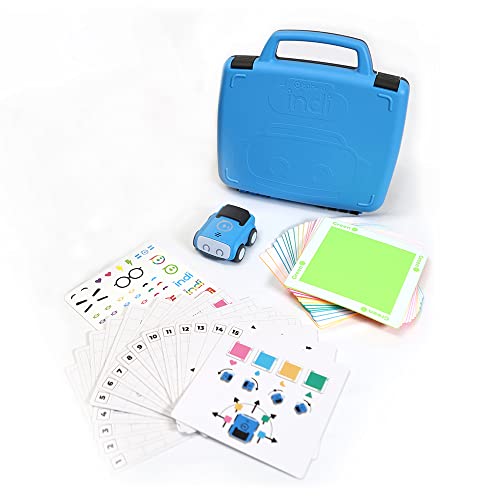
- Screenless play with color tiles
- Includes Challenge Cards and lessons
- Durable and rechargeable for classrooms
- Teaches sequencing, pattern recognition, cause-and-effect
Trade-offs
- Screenless mode limits older kids' engagement
- No advanced coding languages for older learners
The Sphero indi Student Kit starts with a set of color tiles that teach computer science basics without a single screen, which is exactly what you want for a four-year-old. Its all-day rechargeable battery and durable build mean it can survive a preschool classroom or a living room floor, and the included Challenge Cards give just enough structure to keep kids from wandering off while leaving room for creative maze-building. This kit is designed for early learners who need to understand cause-and-effect and sequencing through interactive play.
The Sphero indi Student Kit is built for ages 4 and up, so it focuses on screenless play with color tiles to teach computer science basics before moving to the Sphero Edu Jr app for simplified block-based coding. That makes it a great match for preschoolers and kindergartners who are still developing fine motor skills and attention spans. Reviewers say it’s durable and rechargeable with all-day battery life. That keeps a classroom full of excited kids learning without interruptions.
Product photos
Wonder Workshop Dash Robot
What We Like
- Voice-activated for hands-free play
- No assembly required out of box
- Five apps teach coding concepts
- Used in 40,000+ schools globally
Trade-offs
- No camera for visual recognition tasks
- Requires app download for full functionality
- Limited to kids ages 6-11 per design
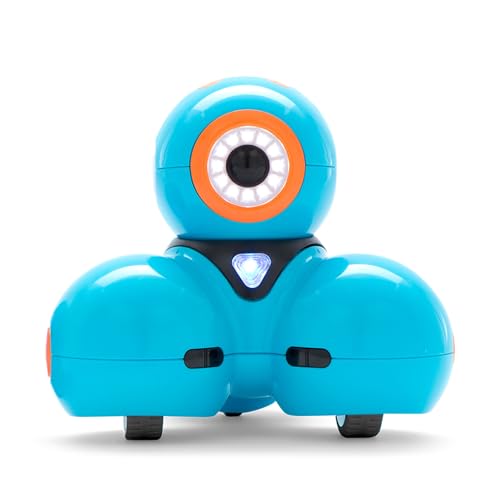
Dash measures 7.2 inches long and weighs 1.5 pounds, so it’s easy for a child to carry around. It responds to voice commands and runs for up to five hours on a charge, which means a curious kid can keep playing without constant recharging. Out of the box, no assembly is needed, and the companion apps Blockly, Wonder, and Path teach coding concepts like sequencing, loops, and variables through hands-on play. For a parent who wants a robot that feels like a friend rather than a project, especially for children ages six to eleven, the combination of instant interaction and real coding education makes this a smart pick.
Dash does not include a camera, so it cannot perform visual recognition tasks that some other coding robots offer. Compared to the Learning Resources Botley Coding Robot, which is screen-free and aimed at ages five and up, Dash’s voice control gives it an edge for spontaneous commands like sing, dance, and navigate. At 1.5 pounds it is light enough for small hands to carry, but the lack of a camera means no obstacle detection or image-based games that some other coding toys in this roundup provide.
Dash is best for kids ages six to eleven who enjoy interactive, app-based coding play. It is not ideal for children who prefer screen-free, button-only play or who need a robot with a camera for visual tracking or visual recognition tasks.
Sphero Bolt+ Coding Robot
What We Like
- Programmable with Python and JavaScript
- Qi wireless charging capability
- Animated LCD screen for data display
Trade-offs
- Only supports 2 learners per robot
- Sealed sphere offers no building or assembly
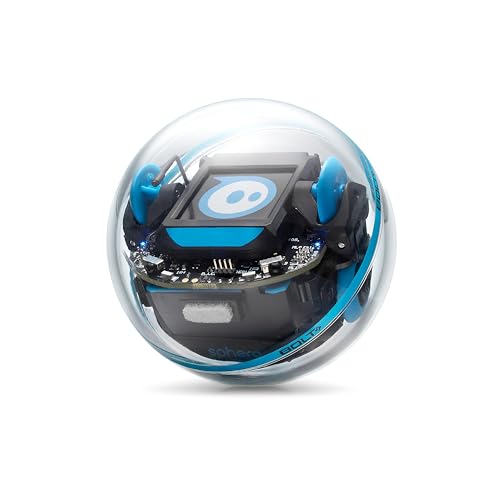
The Bolt+ is a sealed sphere, not a build-it-yourself kit. If your child loves snapping together gears and chassis, something like the Makeblock mBot offers that hands-on construction experience alongside Scratch and Arduino coding. But for a student ready to move beyond block-based programming into real text-based languages, the Bolt+ delivers a cleaner, more focused path, no assembly distractions, just code and immediate results. It supports up to two learners per robot, which works well for pair programming but means a larger group will need multiple units.
Product photos
HPROMOT 5-in-1 STEM Robot Building Kit
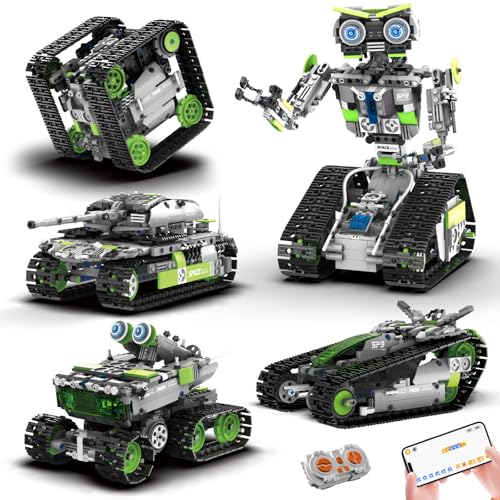
What We Like
- 757 pieces for five distinct builds
- Four control modes including coding
- Rechargeable robot battery included
- Step-by-step illustrated instructions
Trade-offs
- Remote controller needs AAA batteries (not included)
- Not suitable for children under 3 due to small parts
With 757 pieces and five different robot models to build, this kit delivers more construction variety than most comparably priced sets. The four control modes, remote, path, gravity, and gravity, let a kid move from simple steering into basic coding logic. It’s the kind of gift that keeps teaching across several birthdays, especially for a kid who likes taking things apart to see how they work before putting them back together again.
The HPROMOT 5-in-1 STEM Robot Building Kit packs 757 pieces into a single box, more than most comparable kits, so a child can build five different robot models without needing a second set. That piece count means the kit grows with a builder’s skill level, from simple assemblies to more complex projects. One catch is that the remote controller runs on two AAA batteries, and those aren’t in the box. If you’ve ever watched a child open a gift and hit that moment of ‘we need batteries,’ you know the pause it creates. Still, for the piece count and the four-control flexibility, it offers good value for a starter coding kit.
ELEGOO Conqueror Robot Tank Kit
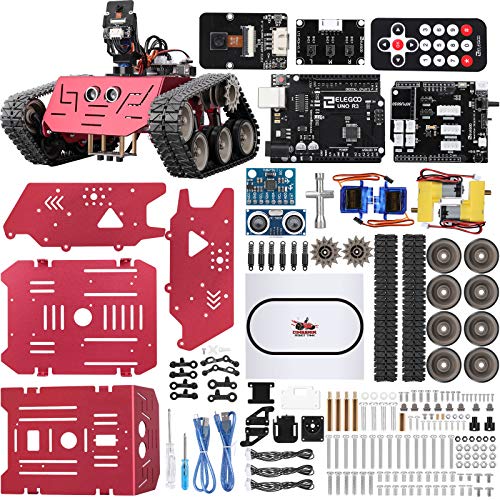
What We Like
- Stainless steel tracked chassis
- Five interactive modes including FPV
- Blocks-to-Arduino coding progression
Trade-offs
- At 3.4 lbs, heavier than simpler kits
- Requires phone for FPV camera use
A stainless steel tracked chassis and a live WiFi FPV camera mean this tank kit is built for builders who want more than a plastic shell on wheels. You get five modes. FPV driving, IR remote, obstacle avoidance, line tracking, and auto follow, so a single project can evolve from a simple patrol route to a maze-challenge bot. The coding path starts with block-based programming in the ElegooKit app and graduates to Arduino IDE, where you can tweak motor speed or sensor thresholds. That makes it a natural fit for a teen or adult who already enjoys tinkering and wants a platform that grows with them, not a toy they will outgrow.
This kit demands patience. At 3.4 pounds with a metal chassis and tracks, it is heavier and more complex to assemble than the Makeblock mBot, which weighs only 2.1 pounds and targets ages 8-12. The mBot is a quicker build for a younger coder; the Conqueror rewards a builder who will enjoy spending an afternoon with a screwdriver and a manual. If your child wants instant driving gratification, this is not it. If they want to learn how a robot actually goes together, and then drive it from the robot’s own eyes, this kit delivers exactly that.
Product photos
Makeblock Codey Rocky Interactive Robot
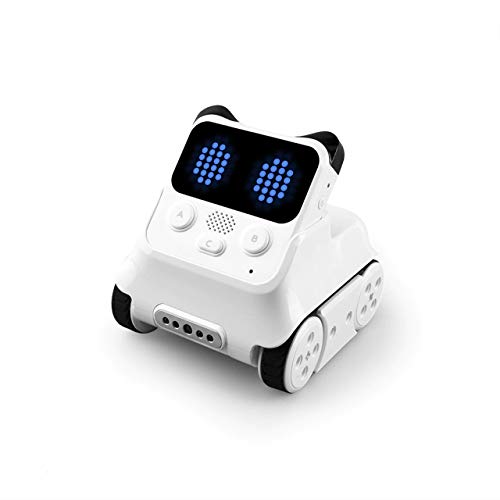
What We Like
- Adorable panda design with expressive emotions
- Ready to play straight out of the box
- Supports Scratch and Python progression
- Building block compatible for creative expansion
Trade-offs
- At 1.4 lb, it's heavier than its tiny size suggests
- No screen-free coding option like Botley offers
The Makeblock Codey Rocky is a compact coding robot that works right out of the box, so a six-year-old can start with remote control play and gradually move into Scratch block coding, then Python. It supports both Scratch and Python programming, which lets kids progress from beginner to more advanced coding. The robot is designed with building block compatibility, so children can add creative elements to their robot. For a parent who wants a first coding toy that grows with a child rather than collecting dust after one session, this is a smart pick.
Size is the main consideration here. At roughly one and a half inches on each side, Codey Rocky is a small robot, which means it’s easy to misplace. That compact build also means the building-block compatibility is limited by the robot’s small frame. If your child prefers larger, more hands-on building projects, the Makeblock mBot, with its larger dimensions, might feel more substantial. But if you want a robot that teaches real programming progression without taking up much space, Codey Rocky delivers exactly that.
Product photos
LEGO Star Wars Boost Droid Commander

What We Like
- Builds three iconic Star Wars droids
- Teaches coding through 40+ missions
- Includes color & distance sensor
- Free LEGO BOOST Star Wars app
Trade-offs
- Requires app and device for full functionality
- At 1,177 pieces, build time is lengthy
- Only three droid models in one set
Three brick-built droids. R2-D2, Gonk Droid, and Mouse Droid, are included in one set. The color and distance sensor, interactive motor, and Bluetooth Move Hub let you connect physical builds to the free LEGO BOOST Star Wars app. Over 40 interactive missions use characters, locations, sounds, and music from episodes I-VI of the Star Wars saga, so coding practice feels like themed play. This set works well for kids who enjoy building and want a structured introduction to programming, especially Star Wars fans.
Building all three droids takes roughly 1,177 pieces, so the construction phase is substantial but finite. Once R2-D2, the Gonk Droid, and the Mouse Droid are assembled, the replay value shifts entirely to the over 40 interactive missions. Each mission uses the color and distance sensor, interactive motor, and Bluetooth Move Hub to create new coding challenges, which keeps the set engaging for repeated play. The free LEGO BOOST Star Wars app provides the coding environment, so kids can revisit missions and try different solutions. This design means the physical build is a one-time experience, but the coding puzzles offer ongoing variety.
Product photos
How We Evaluated Robot Toys
Our evaluation is research-based: we studied manufacturer specifications, curriculum documentation, expert round-ups from child development and education sources, and patterns in owner feedback. Instead, we looked for the features that consistently separate a toy that teaches from one that collects dust.
Four criteria mattered most. Age alignment came first, a robot designed for 8-year-olds will frustrate a 4-year-old and bore a 12-year-old. We checked each product’s stated age range against the complexity of its assembly, coding interface, and required adult supervision. Coding progression was second. The best robots grow with a child, moving from block-based Scratch to text-based Python or Arduino. We prioritized kits that offer a clear next step rather than a dead end.
Build quality and durability ranked third, especially for classroom or multi-child use. We looked at materials, battery type, and whether the robot could survive drops. Finally, we evaluated versatility, how many models a kit builds, whether it offers screen-free and app-based play, and if expansion modules are available. The honest limit of a research-led evaluation is that we cannot report on long-term durability or how a robot performs after months of daily play. But owner feedback patterns gave us strong signals on common issues.
For a broader look at how these toys fit into play and learning, our guide to best robot toys for kids covers the full landscape of options and considerations.
What To Look For In Robot Toys
Matching a robot to your child’s age and patience level is the single biggest factor. The right robot should challenge without frustrating and offer a clear next step when they master the basics.
Age and Skill Alignment
The most common mistake is buying a robot that is too old or too young. A kit like the Makeblock mBot targets ages 8-12 and expects reading fluency and fine motor control for assembly. The Sphero indi, by contrast, works for ages 4 and up with no reading required. Check the manufacturer’s age range, then consider your child’s experience, a 7-year-old who has done LEGO Technic builds may handle an 8+ kit, while a 9-year-old who prefers instant play may not.
Coding Progression
Look for a robot that offers at least two stages of coding. The best ones start with block-based Scratch (drag-and-drop) and later unlock text-based languages like Python or Arduino. The Makeblock mBot and the ELEGOO Conqueror Robot Tank Kit both follow this path. Robots with only one coding mode, like some app-only bots, can feel limiting once a child masters the basics. Our coding toys guide breaks down which robots teach which languages.
Assembly and Setup Time
Some robots are ready in seconds; others take hours. The Sphero Bolt+ requires no assembly, just charge and play. The ACIKETO 6-in-1 kit has 780 pieces and requires long building sessions before any play begins. The Makeblock mBot builds in 15 minutes with clear instructions. Be honest about your child’s patience and your own willingness to supervise. A kit that takes too long to build will end up in a closet.
- Check whether batteries are included (many are not).
- Confirm the robot works with your device (iOS, Android, or tablet).
- Look for rechargeable batteries to avoid ongoing costs.
- Verify whether the robot requires an internet connection to function.
- Consider storage space for large-piece kits.
A robot that takes longer to build than to play is the wrong robot for a child who loves building, not a child who wants to drive.
Robot Toys Compared
The table below compares the nine robots across the key factors that matter most families care about: age range, assembly time, coding progression, and control options.
| Product | Age Range | Weight | Dimensions |
|---|---|---|---|
| Makeblock mBot STEM Coding Robot | 8-12 | 2.1 pounds | L 6.7 inches, W 3.5 inches, H 7.9 inches |
| ACIKETO 6-in-1 STEM Robot Building Kit | 8-16+ | N/A | L 10.5 inches, W 9.5 inches, H 2.4 inches |
| Sphero indi Student Kit | Ages 4+ | 0.8 pounds | L 10.0 inches, W 10.0 inches, H 2.5 inches |
| Wonder Workshop Dash Robot | 6-11 years | 1.5 pounds | L 7.2 inches, W 6.7 inches, H 6.3 inches |
| Sphero Bolt+ Coding Robot | Ages 8+ | N/A | L 2.9 inches, W 2.9 inches, H 2.9 inches |
| HPROMOT 5-in-1 STEM Robot Building Kit | 8-16 | N/A | L 3.9 inches, W 8.7 inches, H 11.8 inches |
| ELEGOO Conqueror Robot Tank Kit | N/A | 3.4 pounds | L 8.6 inches, W 8.8 inches, H 7.4 inches |
| Makeblock Codey Rocky Interactive Robot | 6-12 years | 1.4 pounds | L 1.6 inches, W 1.5 inches, H 1.6 inches |
| LEGO Star Wars Boost Droid Commander | N/A | 2.2 pounds | L 21.3 inches, W 11.1 inches, H 3.6 inches |
Frequently Asked Questions
What age is the best robot toy for a 4-year-old?
The Sphero indi Student Kit is the best choice for children ages 4 and up. It uses color tiles for screen-free play, requires no reading, and teaches sequencing and cause-and-effect through placement of the tiles. It is durable, rechargeable, and includes Challenge Cards and lessons.
What is the difference between a robot toy and a coding toy?
A robot toy is a physical, physical machine that moves or reacts. A coding toy is any toy that a child uses to program instructions. Some robots, like the Makeblock mBot, is both, it is a robot and teaches coding. Many products on this list fall in both categories.
Can a robot toy teach my child Python?
Yes, several can. The Sphero Bolt+ Coding Robot supports Python and JavaScript. The Makeblock Codey Rocky Interactive Robot also moves from Scratch to Python. The ELEGOO Conqueror Robot Tank Kit progresses from blocks Arduino to Arduino IDE. These are best suited for ages 8 and up with reading fluency.
How do I choose between a robot that builds and a robot that is ready to play?
A robot that builds requires patience and patience and patience and is fine motor control. The Makeblock mBot builds in 15 minutes. The ACIKETO 6-in-1 kit takes longer. A robot that is ready to play, like the Wonder Workshop Dash works out of the box. Choose based on your child’s preference for building versus instant play.
What is the best robot toy for a 10-year-old for 10-year-old?
The ACIKETO 6-in-1 STEM Robot Building Kit is a strong fit for ages 8-16. It builds six models from 780 pieces and offers app control with path coding. The ELEGOO Conqueror Robot Tank Kit is also suitable for ages 8 and up and is built for teens and teens who enjoy hands-on hands-on building. Our guide to robot toys for 10 year olds provides more detail.
The Bottom Line
The Makeblock mBot STEM Coding Robot is the best overall for families who want a robot that teaches real programming from Scratch to Arduino. It builds in 15 minutes, works with over 100 modules and offers line-follow and obstacle-avoidance modes. It is best for ages 8-12 who are ready to build and learn.
For a child who wants variety from a single kit, the ACIKETO 6-in-1 STEM Robot Building Kit builds six different models from 780 pieces. For a child starting younger, the Sphero indi Student Kit offers screen-free play with color tiles. The single most important factor is matching the robot’s age range to your child’s patience and skill level.
