
10 Best Tech Toys in 2026
This post contains affiliate links. As an Amazon Associate, we earn from qualifying purchases.
The Snap Circuits Explorer SC-100 STEM Kit takes the Best Overall spot because it offers over 100 projects from just 29 parts. No tools or soldering are required, so it is the most accessible introduction to electronics. For screen-free coding fans, the Learning Resources Botley Coding Robot Set earns Best Screen-Free Coding Toy, while the Thames & Kosmos Coding Chameleon Robot wins Best Gesture-Responsive Robot with its physical action-card programming.
The challenge with tech toys is finding ones that actually teach something without frustrating your child with complex setup or requiring constant screen time. Many toys advertise “STEM” but deliver little more than flashing lights and a dead battery after ten minutes.
This guide is built from manufacturer specifications, patterns in owner feedback, and expert round-ups of the most effective educational tech toys. We evaluated each toy for its learning value, durability, age appropriateness, and how long it keeps kids engaged before the novelty wears off.
Top 10 Tech Toys in the Market
Certain content that appears on this site comes from Amazon. This content is provided "as is" and is subject to change or removal at any time.
The Best Tech Toys, Reviewed
Snap Circuits Explorer SC-100 STEM Kit
What We Like
- 100+ projects from 29 parts
- No tools or soldering required
- Award-winning design (multiple awards)
- Color-coded, numbered parts snap on grid
Trade-offs
- Batteries not included
- Projects limited to included parts only
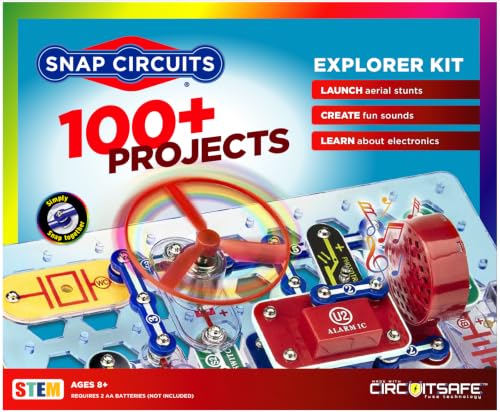
With 100-plus projects packed into a 1.4-pound box that needs zero tools or soldering, this kit turns a coffee table into a mini electronics lab in about ten seconds. The numbered, color-coded parts snap onto a plastic grid, so an eight-year-old can build a flying saucer or an alarm circuit without frustration. That instant success removes every barrier between a curious kid and a working gadget, letting the learning happen through play rather than instruction manual wrestling.
The trade-off is that you’re limited to the 29 included parts, so once the 100 projects are done, you’ll need another Snap Circuits kit to keep going. That’s a real consideration if your child burns through projects fast. For families who want a screen-free, frustration-free introduction to circuitry that actually works the first time, this is the one.
Thames & Kosmos Coding Chameleon Robot

What We Like
- Screen-free coding with physical action cards
- Color sensor and infrared sensor included
Trade-offs
- At 15 inches, takes up table space
- Uses Duracell batteries not included
A color sensor and infrared sensor let this chameleon react to colored action cards and your hand gestures, all without a screen or app. Kids build the robot, then program it by placing physical cards in sequence, which teaches cause-and-effect coding in a hands-on way. The 48-page manual walks through assembly and explains how nature inspires engineering, so it works well for an 8-year-old with a patient adult or a confident 12-year-old working solo. Families who want coding skills without screen time, and kids who love animals and robotics, will find this a rewarding project.
Compared to the Learning Resources Botley set, which is ready to play out of the box for ages 5-7, this one demands more patience upfront but rewards with richer interactivity once built.
Learning Resources Botley Coding Robot Set
What We Like
- Ready to code out of the box
- 77-piece activity set included
- Detects and avoids objects
- Follows looping commands and black lines
Trade-offs
- Batteries not included for robot or remote
- Targets ages 5-7, limited for older kids
- No app or advanced language coding
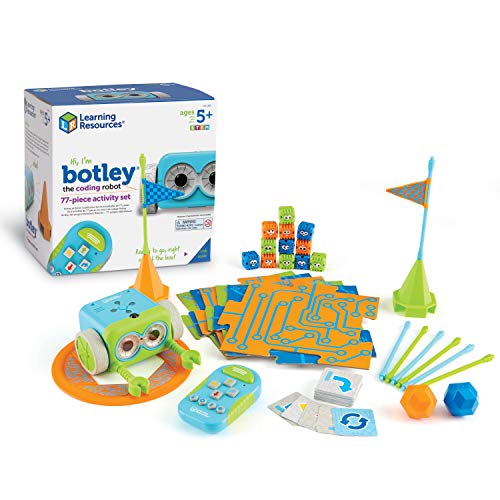
A 77-piece set that works right out of the box means no assembly frustration and no waiting for a tablet to charge. Botley rolls on its own wheels, uses arrow-button programming to follow looping commands, detect objects, and even trace black-line paths. That makes it a reasonable choice for the 5-7 crowd who are just starting to wrap their heads around cause-and-effect logic. The included coding cards and obstacle pieces turn the living room floor into a low-stakes engineering lab, which is exactly what the “screen-free” promise delivers.
The age cap is the main limitation: the remote programmer and preset challenges will feel simple to a curious 8-year-old who wants to write real code or control a bot from a phone. If that describes your kid, the Sphero Mini offers app-based block and text coding for a similar budget. But for a first robot that teaches sequencing and problem-solving without a single glowing screen, Botley is the one that gets them thinking like an engineer before they even know what that means.
Product photos
Sillbird 5-in-1 STEM Robot Building Kit
What We Like
- Five buildable models in one kit
- App and remote dual control modes
- Rechargeable with 40-minute playtime
- Clear step-by-step build instructions
Trade-offs
- 40-minute battery life limits longer play sessions
- Requires smartphone or tablet for app control
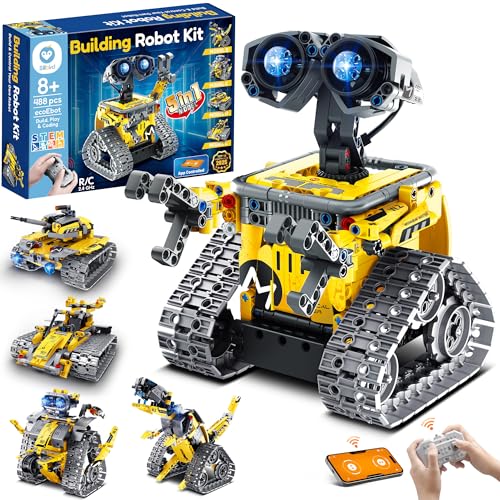
The 488-piece count and five buildable models mean this kit keeps giving long after the first build is done. A kid can follow the clear instructions to assemble a robot, then tear it down and make a dinosaur, a car, a tank, or another model, each with adjustable head, arms, or tail for posing. That progressive difficulty (from simple to complex) lets a child build confidence step by step, and the dual app-and-remote control adds a layer of interactive play that goes beyond static construction. It’s a solid fit for an 8-to-12-year-old who likes to build and wants something that doesn’t get stale after one afternoon.
Battery life is the trade-off: 40 minutes per charge means you’ll need to plan play sessions or have the charging cable handy. The Sillbird gives you five builds and a rechargeable battery that spares you from buying disposables. If your kid loves the process of assembling and re-assembling more than marathon play, this kit hits a sweet spot between creativity and control.
Sphero Mini Green Coding Robot Ball
What We Like
- Ping-pong-ball size fits in a pocket
- Three drive modes: Joystick, Slingshot, Tilt
- Free Sphero Edu app supports draw, blocks, JavaScript
Trade-offs
- 1-hour battery limits extended play sessions
- No screen-free option: requires smartphone or tablet
- Small size easy to lose under furniture
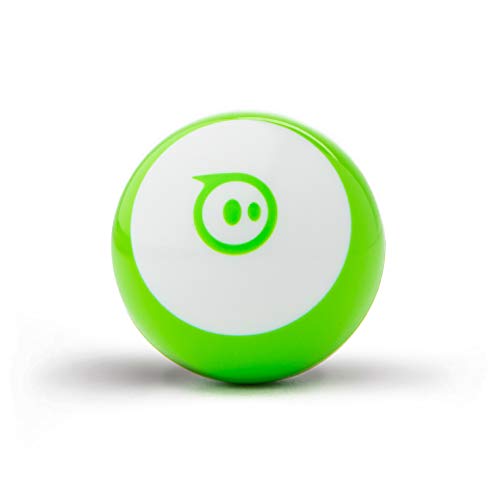
A ping-pong-sized robot that fits in your palm means you can toss it in a backpack and code anywhere. This tiny ball packs a gyroscope, accelerometer, and colorful LEDs, plus three drive modes. Joystick, Slingshot, and Tilt, so a beginner can start driving immediately. It suits a family that wants coding lessons that don’t feel like homework and a toy that travels without a carrying case.
One-hour battery life means you will need to recharge between sessions, and every bit of fun requires a phone or tablet, as there is no screen-free mode. Compare that to the Learning Resources Botley set, which is designed for screen-free play; Botley is better for a household that limits device time. But if your child already has a tablet and you want a coding toy that shrinks down to pocket size and supports drawing, blocks, and JavaScript, this little ball earns its spot in the bag.
Product photos
Sphero Bolt+ Coding Robot
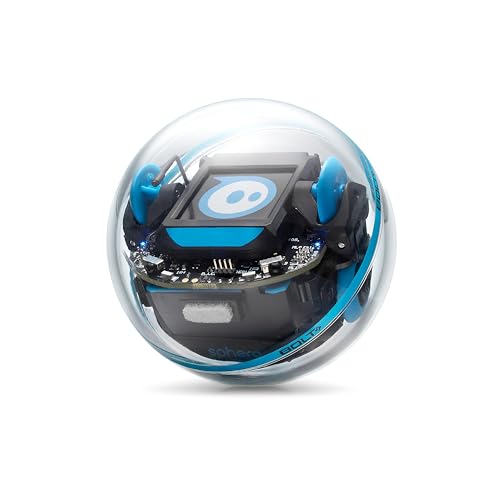
What We Like
- Programmable in Python and JavaScript
- Qi wireless charging with all-day battery
- Durable, waterproof shell
Trade-offs
- Only supports 2 learners per robot
- No screen-free programming option available
A fully programmable robot that runs Python and JavaScript means this isn’t a toy you outgrow in a week. The Sphero Bolt+ gives you real coding power inside a 2.9-inch waterproof ball that charges wirelessly and lasts a full school day. That combination makes it a natural fit for classrooms where you want one device to serve beginners dragging blocks and advanced students writing scripts, all without hunting for charging cables or worrying about spills. If you’re looking for a robot that grows with a learner from grade 3 through 10, this is the one that keeps up.
Each Bolt+ is designed for just two learners at a time, so a full class needs multiple units to keep everyone coding. Compare that to the Makeblock mBot Ranger, which supports Scratch and Arduino programming and involves more building, but does not offer the same ready-to-use programming in Python and JavaScript. For a parent or educator who wants coding depth over building variety, the Bolt+ delivers a cleaner path from drag-and-drop to real-world programming without needing a screwdriver.
Learning Resources Code & Go Robot Mouse Set

What We Like
- Screen-free coding for young kids
- Includes 16 maze grids and 22 walls
- Teaches sequencing and problem-solving
- Designed for ages 4 and up
Trade-offs
- Requires 3 AAA batteries not included
- Maze board at 20" x 20" limits large-group play
- No app or advanced programming modes
A 20-by-20-inch maze board and 30 double-sided coding cards mean a four-year-old can start programming by pressing arrow buttons on a plastic mouse, not staring at a screen. This kit is built for the youngest coders who need concrete cause-and-effect: press forward, the mouse rolls forward; press left, it turns. The included walls and tunnels let you change the challenge each time, so a child who just figured out a straight path can try a corner next. That repeated trial-and-error builds confidence fast, and the activity guide keeps adults from guessing what to do first.
This button-and-card system is strictly one-button-per-action, so older kids who want to write code or control a robot from a tablet will outgrow it quickly. Compared to the Botley Coding Robot Set from the same brand, the Code & Go mouse uses a simpler approach that works better for true beginners. Botley offers more advanced features like object detection and programmable sequences. If you have a five-year-old who still puts toys in their mouth sometimes, this mouse is safer and more focused. If you need something that grows with a child into elementary school, look at Botley instead.
Product photos
Makeblock mBot Ranger 3-in-1 Coding Robot
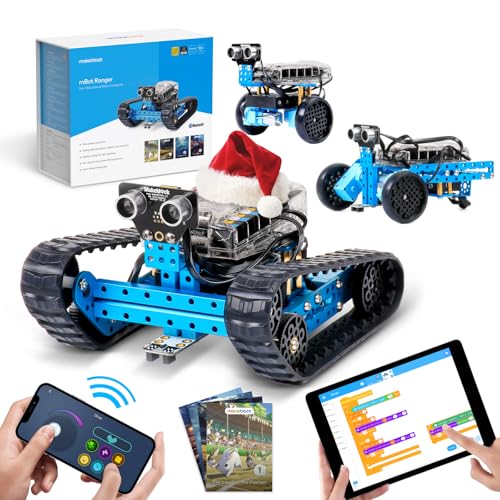
What We Like
- Three robot builds in one kit
- Teaches Scratch and Arduino coding
- Includes gyroscope, ultrasonic, and light sensors
Trade-offs
- Requires 6 AA batteries (not included)
- At 3.5 pounds, it's heavier than many coding robots
A 3.5-pound robot with a metal frame that handles outdoor terrain like ruddy ground and smooth floors means this kit is built for kids who want to take their coding outside. The three-in-one design includes a tank-like Land Raider, a self-balancing Nervous Bird, and a three-wheeled Dashing Raptor, giving them three different builds in one box. It suits the tinkerer who likes building as much as programming, especially if they’ve already tried a simpler robot and want more sensors, gyroscope, ultrasonic, line-tracking, light, and temperature, to play with. Scratch and Arduino support let them start with drag-and-drop code and grow into text-based programming through the mBlock5 app.
That rugged build comes with weight: at 3.5 pounds, this is noticeably heavier than the Sphero Mini (0.2 pounds) or the Botley set (2.2 pounds), so it’s less portable for tossing in a backpack. It also needs six AA batteries that aren’t included, which adds an upfront cost and means you’ll want rechargeables on hand. For the kid who’s ready to move past snap-together circuits like the Snap Explorer SC-100 and wants a robot that can handle a bumpy driveway, the Ranger’s metal parts and grip tracks make that worth the extra heft.
Kiothdre 5-in-1 STEM Farm Robot Kit

What We Like
- Five distinct farm-vehicle builds
- APP includes graphical programming interface
- Compatible with mainstream building blocks
- Non-toxic, ASTM & CPSIA certified materials
Trade-offs
- Remote requires 2 AAA batteries (not included)
- No rechargeable battery in the robot itself
The ability to build five different farm vehicles from a single kit means a child can assemble a harvester, plowing cart, farm defender, water truck, or grab wooden truck without needing separate sets. That variety keeps the building experience fresh and connects directly to learning how real farm machines operate. The dedicated app uses a graphical programming interface with colorful icons, which the manufacturer says makes it intuitive for beginners to start coding. For a child interested in farm vehicles, this kit offers hands-on engineering with a clear agricultural theme.
The remote control requires two AAA batteries that aren’t included, so you’ll need to buy disposables or invest in rechargeable cells. Compared to the Sillbird 5-in-1 STEM Robot Building Kit, which also offers five models and app control for a similar age group, the Kiothdre is described as a farm-themed set. That focus makes it a good fit for a child who enjoys farm-themed play, but less ideal if they prefer a different theme.
Product photos
Aukfa STEM Robot Building Kit

What We Like
- USB rechargeable, no battery swaps
- 4 app modes: gyro, path, voice, programming
- Kid-safe ABS with multiple safety certifications
Trade-offs
- Remote control requires 3 AAA batteries (not included)
- App requires ISO V9.0 or Android V5.0 or above
- Building required before play
A USB rechargeable robot means you plug it in when the battery runs low instead of hunting for spare AAs, a small convenience that adds up fast when kids play daily. This kit suits families who want a single robot that does a bit of everything: building, coding basics, voice control, and even a gyro mode that turns the tablet into a steering wheel. The grip tracks handle indoor floors and rougher outdoor ground equally well, so it doesn’t get stuck on a rug or a patch of dirt.
The Aukfa STEM Robot Building Kit includes a single tracked chassis that can be controlled via remote or app. So if your child prefers mastering one robot with multiple control modes rather than switching between different builds, this is a practical choice. The remote control range reaches up to 65 feet, which gives plenty of room for indoor play, though the remote requires 3 AAA batteries (not included). The app works on iOS 9.0 or above and Android 5.0 or above, so older phones or tablets might not support it.
Product photos
How We Evaluated Tech Toys
We analyzed each toy’s technical specifications, manufacturer documentation, and the patterns found in thousands of owner reviews and expert round-ups. Every product had to demonstrate genuine educational value rather than just marketing claims about “STEM.” We paid special attention to build quality, battery requirements, and whether the toy actually works as advertised out of the box.
The four criteria that mattered most were learning depth (does it teach real concepts or just mimic them?), age accuracy (is the difficulty appropriate for the claimed range?), replayability (can a child use it more than once without boredom?), and screen dependency (does it require a tablet or phone, or can it work independently?). A toy that needs an app but promises screen-free play lost points immediately.
An evaluation based on research has limits, and not every robot has been used for months in a classroom. Instead, we cross-referenced what hundreds of parents report about durability, battery life, and which toys get abandoned after a week. This gives you a reliable picture of what actually works at home, even if we can’t claim personal experience.
What To Look For In Tech Toys
Before you buy, focus on three things: the real age range (not the one on the box), the battery situation (some toys eat batteries faster than kids eat candy), and whether the toy grows with your child or gets outgrown in a weekend.
Look for tech toys that match your child’s actual attention span, use standard batteries or rechargeable power, and offer multiple ways to play so the toy stays interesting past the first session.
Age Appropriateness and Skill Level
The age range on the box often reflects marketing optimism more than reality. A toy labeled “ages 8+” might frustrate an 8-year-old who hasn’t learned basic logic, while a “5-7” toy might bore a curious 6-year-old who already understands sequencing. Look at the actual skills required: does the child need to read instructions independently?
Can they build without help? Many parents report that the Learning Resources Code & Go Robot Mouse works perfectly for ages 4-6, while the Sillbird 5-in-1 STEM Robot Building Kit requires a solid 8-year-old who enjoys following multi-step instructions.
Battery Life and Power Requirements
Nothing kills a tech toy faster than a dead battery at the wrong moment. Check what batteries each toy needs and whether they’re included. The Sphero Mini runs on a rechargeable battery with about one hour of play, while the Sphero Bolt+ offers Qi wireless charging with all-day battery life. The Makeblock mBot Ranger eats six AA batteries, which adds up fast. For families tired of buying batteries, the Aukfa STEM Robot Building Kit is USB rechargeable, a genuine convenience.
Screen Dependency and Learning Progression
Some kids thrive with app-based control; others need physical buttons and tangible feedback. The Botley Coding Robot and Code & Go Robot Mouse offer completely screen-free coding with physical cards and buttons. The Sphero Mini and Bolt+ require a smartphone or tablet but support progression from draw-based coding through blocks to JavaScript and Python. Think about where your child is now and where they might be in six months. The best coding toys offer a clear path from beginner to advanced without requiring a new purchase.
Build Quality and Durability
- Check whether the toy uses snap-together connections or requires screws and tools
- Look for safety certifications like ASTM and CPSIA, especially for younger children
- Consider where the toy will be used, indoor robots with exposed wiring won’t survive outdoor play
- Read owner feedback about broken parts: some kits have fragile connectors that snap under normal use
A well-built tech toy should survive at least one drop off a coffee table without needing repairs.
Tech Toys Compared
The table below compares all ten tech toys across key features so you can see at a glance which one fits your child’s age, skill level, and preferred play style.
| Product | Age Range | Control Method | Weight |
|---|---|---|---|
| Snap Circuits Explorer SC-100 STEM Kit | 8+ | N/A | 1.4 pounds |
| Thames & Kosmos Coding Chameleon Robot | 8+ | Coding, Wild, Pet | 1.5 pounds |
| Learning Resources Botley Coding Robot Set | 5-7 years | Screen-free | 2.2 pounds |
| Sillbird 5-in-1 STEM Robot Building Kit | 8+ | App (Bluetooth) + remote | 1.8 pounds |
| Sphero Mini Green Coding Robot Ball | 8+ | Draw, blocks, JavaScript | 0.2 pounds |
| Sphero Bolt+ Coding Robot | 8+ | Draw, Blocks, Python, JavaScript | N/A |
| Learning Resources Code & Go Robot Mouse Set | Ages 4+ | Screen-free | 3.9 pounds |
| Makeblock mBot Ranger 3-in-1 Coding Robot | Ages 10+ | Scratch & Arduino | 3.5 pounds |
| Kiothdre 5-in-1 STEM Farm Robot Kit | 6-14 years | 2.4G remote + APP | N/A |
| Aukfa STEM Robot Building Kit | 6-14+ years | Remote + App (4 modes) | N/A |
Frequently Asked Questions
What is the best tech toy for a 5-year-old?
The Learning Resources Botley Coding Robot Set is the best choice for ages 5-7. It works right out of the box with no screen required, includes 77 activity pieces, and teaches basic coding logic through physical play. For a 4-year-old just starting, the Code & Go Robot Mouse offers simpler sequencing with maze grids and walls.
Are tech toys actually educational or just entertainment?
The best tech toys teach real skills like sequencing, problem-solving, and logic through play. Products like the Snap Circuits Explorer SC-100 teach actual electronics principles without requiring soldering or tools. Look for toys that require the child to think, plan, and troubleshoot, not just press a button and watch something happen.
What age should kids start learning to code?
Children as young as 4 can learn basic sequencing and cause-and-effect logic with screen-free toys like the Code & Go Robot Mouse. Around ages 5-7, toys like Botley introduce looping commands and object detection. By age 8, kids can handle block-based coding apps, and by age 10, they can start text-based languages like Python or JavaScript with robots like the Sphero Bolt+.
Do I need a tablet or smartphone for these tech toys?
It depends on the toy. The Snap Circuits Explorer, Botley Coding Robot, and Code & Go Robot Mouse work completely screen-free. The Sphero Mini, Sphero Bolt+, and Sillbird 5-in-1 require a smartphone or tablet for app control. The Thames & Kosmos Coding Chameleon uses physical action cards but also needs a device for some features. Check the product details before buying if screen-free play is important to your family.
What is the difference between coding toys and STEM toys?
Coding toys specifically teach programming logic, sequencing, loops, conditionals, and debugging. STEM toys cover a broader range of science, technology, engineering, and math concepts. The Snap Circuits Explorer is a STEM toy that teaches electronics, while the Botley and Sphero robots are coding toys. Many products, like the Sillbird 5-in-1, combine both by teaching building skills and app-based programming.
The Bottom Line
The Snap Circuits Explorer SC-100 STEM Kit wins as Best Overall because it delivers the most learning per dollar. It offers over 100 projects, no tools required, and a proven track record of keeping kids engaged for hours. It’s the perfect starting point for any child ages 8 and up who shows curiosity about how electronics work.
If your child prefers robots over circuits, the Botley Coding Robot offers the best screen-free coding experience for ages 5-7, while the Sphero Bolt+ serves older students ready to learn Python and JavaScript. For families who want maximum variety from one kit, the Sillbird 5-in-1 and Makeblock mBot Ranger each offer multiple build options.
The single most important factor in choosing a tech toy is matching it to your child’s actual attention span and reading ability, not their age on the box. A toy that’s too hard frustrates and collects dust. One that’s too easy bores after a weekend. Pick the toy that challenges just enough to keep them curious.
