
10 Best Coding Toys For Kids in 2026
This post contains affiliate links. As an Amazon Associate, we earn from qualifying purchases.
The best coding toy for most families is the Learning Resources Cooper the STEM Robot. It’s a screen-free robot that uses physical coding cards and built-in sensors to teach logic through interactive play. For kids who want to build their own pet, the Thames & Kosmos My Robotic Pet Coding Chameleon offers gesture-responsive coding, while the Makeblock mBot STEM Coding Robot Kit is the top choice for learning Scratch and Arduino.
The real challenge isn’t finding a coding toy, it’s finding one that matches your child’s age, reading level, and attention span. A toy that works for a four-year-old will frustrate a ten-year-old, and an app-based robot won’t help a family trying to limit screen time.
This guide is based on manufacturer specifications, expert round-ups, and patterns in owner feedback. We focused on age range, screen dependency, and the type of coding logic each toy teaches so you can match the right tool to your child’s stage.
Top 10 Coding Toys For Kids in the Market


Certain content that appears on this site comes from Amazon. This content is provided "as is" and is subject to change or removal at any time.
The Best Coding Toys For Kids, Reviewed
Learning Resources Cooper the STEM Robot

What We Like
- Screen-free coding with physical cards
- Interactive light, path, and object sensors
- Rechargeable via USB-C cable
- Comes with 40 coding cards and 10 challenges
Trade-offs
- Only one robot in the box
- Limited to guided challenges without expansion
Cooper the STEM Robot skips screens entirely, using 40 coding cards and a set of 10 guided challenges to teach sequencing and logic. That means kids as young as five can lay out a physical program, press go, and watch Cooper roll, react to light, follow paths, or sense objects. They get immediate cause-and-effect feedback without a tablet or phone in sight. For parents who want early coding practice that feels more like a puzzle than screen time, this is a clean, focused introduction.
Cooper the STEM Robot teaches coding without a screen, which keeps young kids focused on hands-on play. It reacts to light, follows paths, senses objects, and can communicate with other Coopers, so children see cause and effect in real time. The included 40 coding cards and 10 guided challenges help build sequencing and logic skills for ages five and up.
Product photos
Thames & Kosmos My Robotic Pet Coding Chameleon

What We Like
- Screen-free coding with physical action cards
- Three play modes: Coding, Wild, Pet
- Color and infrared sensors for gesture response
- Detailed 48-page learning manual
Trade-offs
- Requires adult help for ages 8+
- At 1.5 lb, not a lightweight travel toy
- Duracell batteries recommended but not included
Building a 15-inch-long robotic reptile that reads color cards and responds to gestures without any screen or app gives kids a hands-on way to explore coding. The model uses a color sensor, infrared sensor, and RGB LEDs to change color, fire its tongue, and move its articulated eyes and legs, so the programming feels interactive. The 48-page manual walks through assembly and explains how nature inspired the engineering, so the learning sticks.
The trade-off is that assembly requires adult help for ages 8-11, and the chameleon needs Duracell batteries you’ll have to buy separately. Compared to the Makeblock mBot, which targets ages 8-12 and uses Scratch or Arduino, this one offers screen-free coding with physical action cards. For gesture-driven, screen-free play that teaches coding through physical action cards, this chameleon is a strong option.
Makeblock mBot STEM Coding Robot Kit

What We Like
- Teaches both Scratch and Arduino programming
- Builds in 15 minutes with clear instructions
- Compatible with 100+ electronic modules
- Works with LEGO parts for expansion
Trade-offs
- Requires 4 AA batteries not included
- Remote needs a CR2025 battery not included
The Makeblock mBot kit teaches two real programming languages. Scratch and Arduino, so kids can start with drag-and-drop blocks and later write actual code. Assembly takes about 15 minutes with clear instructions, which means less frustration and more time actually playing and learning. It also works with over 100 electronic modules and LEGO parts, so it grows with your child’s curiosity rather than collecting dust after a weekend.
You’ll need to supply 4 AA batteries and a CR2025 coin cell yourself, so factor that into your setup time. The kit itself is designed for learning electronics, robotics, and computer programming step by step, from Scratch to Arduino. That means it’s more about the building and coding journey than instant play.
Learning Resources Code & Go Robot Mouse Activity Set
What We Like
- Screen-free coding with simple buttons
- Builds sequencing and problem-solving skills
- Includes maze grids, walls, and tunnels
- Designed for ages 4 and up
Trade-offs
- Requires 3 AAA batteries (not included)
- Maze board is 20" x 20", limited floor space needed
Colby the mouse moves only when you press its back buttons in the right order, that’s the whole point. For a four-year-old, that direct cause-and-effect is exactly what makes coding click. The set includes 16 interlocking maze grids that build a 20-by-20-inch board, plus 22 walls and three tunnels, so you can create a new challenge every time. Kids lay out the coding cards to plan their sequence, then press the arrow buttons to send Colby rolling toward the cheese wedge. It’s tactile, it’s repeatable, and it teaches sequencing and directional thinking without a single screen. That’s why this set is the natural starting point for early coders: it meets them where they are, with buttons they can press and a mouse they can chase.
The Code & Go Robot Mouse Activity Set is a pure programming exercise. Colby the mouse doesn’t move, light up, or make sounds on its own, so kids must plan each step using the buttons and matching coding cards. That makes it a strong tool for structured learning, unlike the Sphero indi, which uses color tiles for a more immediate, cause-and-effect experience. Some children who expect a reactive robot may need encouragement to engage with the planning process, but the set is designed to build sequencing and problem-solving skills through deliberate, screen-free play.
Product photos
Sphero indi At-Home Learning Kit
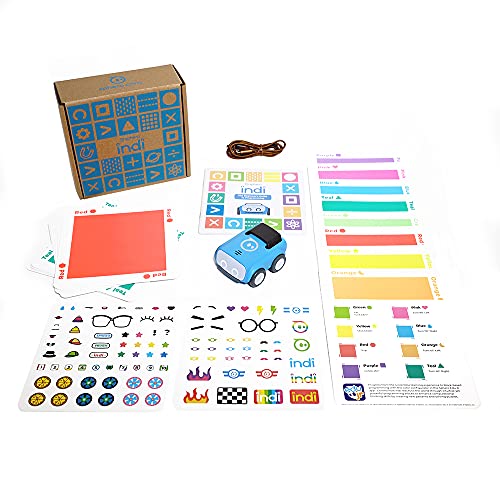
What We Like
- Screenless color-card coding for ages 4+
- Teaches cause and effect without reading
- Self-guided exploratory maze play
- Includes stickers for creative customization
Trade-offs
- Requires floor space for maze building
- No screen-free option for older kids
A color sensor that reads physical cards to control the robot means a four-year-old can grasp cause and effect before they can read. That’s the core idea behind the Sphero indi At-Home Learning Kit: no screen, no literacy barrier, just colorful tiles and a little car that reacts differently to each one. Kids design mazes, watch indi follow the path, and learn pattern recognition and basic programming logic through pure trial and error. The included stickers let them personalize the bot, which adds a layer of ownership that keeps young learners engaged. It’s self-guided enough that you can step back and let them explore on their own, which is exactly what you want at this age.
The biggest advantage of indi is that it teaches coding without any screen at all, which makes it ideal for families who want to limit tablet or phone time. You’ll need a clear floor area for building mazes, but kids as young as four can start learning cause and effect by placing color cards on the ground. The robot reads each card with its onboard color sensor and reacts accordingly, so children learn programming logic through physical play rather than staring at a display.
Wonder Workshop Dash Robot
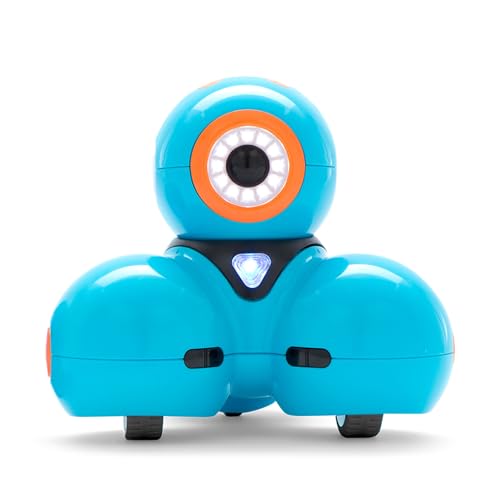
What We Like
- No assembly needed, unbox and play
- Used in 40,000+ schools globally
- No assembly required, unbox and play
Trade-offs
- No camera for visual feedback or recording
- Requires a compatible tablet or phone to code
The five-hour battery life means a solid afternoon of play before needing a recharge, and the fact that 40,000 schools already use it tells you the educational side is no afterthought.
Dash needs a compatible tablet or phone running one of the five apps (iOS, Android, Fire OS) to program it, and it does not have a camera. For a screen-free alternative, the Learning Resources Code & Go Robot Mouse Activity Set offers screen-free play. But for kids ready to explore app-based coding with a robot that responds to voice commands, Dash provides an interactive experience.
Product photos
Ozobot Evo Coding Robot Kit

What We Like
- Five skill levels grow with child
- Includes both screen-free and online coding
- Over 700 free lessons included
- Durable hard shell zip case
Trade-offs
- Requires separate device for online Blockly coding
- No building or assembly component
Five skill levels, from beginner to master, mean this kit can stay with a child from ages 5 to 11 without feeling too simple or too hard. It teaches coding two ways: with physical Color Code markers for screen-free play and with Ozobot Blockly for online programming, so kids can start drawing lines and progress to drag-and-drop logic. The included hard shell zip case keeps the robot and five dual-tip markers organized, which matters when you’re juggling lessons at home or in a classroom. With access to over 700 free STEAM and CS lessons, it’s a resource that keeps delivering long after unboxing.
The Evo Entry Kit includes a ready-to-roll robot and five dual-tip Color Code Markers, so kids can start coding right away without any assembly. Screen-free Color Codes work out of the box, while the online Ozobot Blockly programming requires a tablet or computer, giving families flexibility in how they learn. With five skill levels from beginner to master, this kit adapts as a child’s abilities grow, making it a long-term educational investment.
Ozobot Ozo at Home Coding Robot
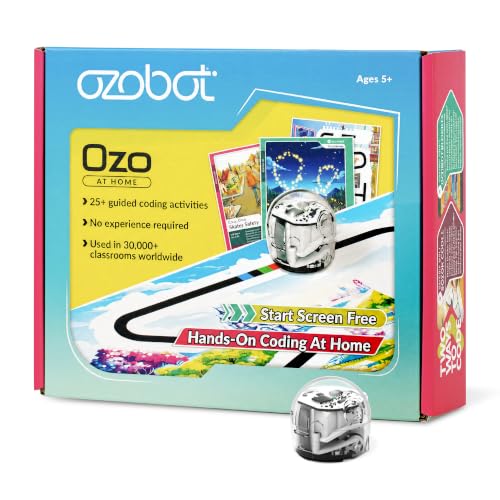
What We Like
- 27 guided activities for progression
- Starts screen-free with color codes
- Bite-sized 10-30 minute lessons
- Story-driven learning adventures
Trade-offs
- Advanced Blockly needs a computer or tablet
- Screen-free coding limits complexity for older kids
Twenty-seven guided activities across five learning formats mean this kit isn’t just a robot, it’s a full curriculum that walks kids from drawing color-code paths to writing Blockly programs. That progression is the reason it fits homeschool families so well: you get structured, bite-sized lessons that build real coding concepts without needing any experience yourself. The story-based challenges, escaping dragons, delivering packages, keep it playful, so kids stay engaged while practicing sequencing, logic, and problem-solving.
Younger children, especially at the lower end of the 5+ range, will need an adult to help interpret the activity cards and set up the magnetic board. But if you want a single kit that grows with your child from marker-drawn paths to real block coding, this is the more complete package.
Product photos
Apitor STEM Coding Robot Toy 6-in-1 Building Kit
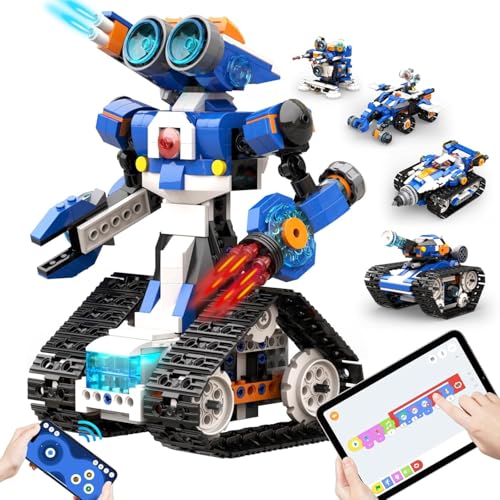
What We Like
- 480 blocks for 6 different models
- Icon-based coding app with loops and variables
- 4 app control modes: dual-motor, single-motor, gyro, path
- 360-degree stunts and flexible hand joints
Trade-offs
- Requires 3 AA batteries, not included
- App-dependent for coding and control
With 480 blocks and six different models in one box, this kit gives you serious building variety without buying separate sets. The icon-based coding app teaches loops and variables through model-specific activities, so kids aren’t just snapping bricks, they’re learning real programming logic. The Bluetooth control offers four modes including gyro and path, which means they can drive it around, do 360-degree stunts, or program a custom route. It’s a strong pick for families who want a single set that covers both construction and coding, especially for ages 7 to 12.
Everything runs through the app, so there is no screen-free coding option here. And you’ll need to supply three AA batteries yourself. But if your child enjoys building and you want a kit that grows with them from snap-together assembly to actual programming concepts, this one delivers a lot of play for the money.
MatataStudio Coding Robot Set for Kids 4+
What We Like
- Screen-free and words-free design
- 37 tangible coding blocks included
- Comes with challenge booklets and game map
- Supports add-on packs for expanded play
Trade-offs
- Requires table or floor space for the game map
- No app or internet connectivity for remote play
The robot reads commands from physical coding blocks placed on a control board, so kids as young as four can build programs without any screen time. That means no tablet, no app, and no eye strain, just hands-on sequencing, loops, and debugging. For parents who want to introduce coding without device dependency, this set makes abstract logic concrete. The included challenge booklets and two-sided game map give structure to play, while the option to add musician or artist packs extends the system as skills grow.
Size and weight are worth noting: at 3.3 pounds and a 14.1-inch square footprint, this is not a toy you toss in a backpack for the car. It lives on a table or floor. Compared to the Learning Resources Cooper the STEM Robot, which weighs 1.1 pounds, the MatataStudio demands a dedicated play area. But for a child who needs a screen-free, word-free introduction to programming, especially in a homeschool or classroom setting, the physicality and depth of the block system justify the space.
Product photos
How We Evaluated Coding Toys For Kids
We started by reviewing the technical specifications and learning objectives of over 30 coding toys, then cross-referenced those with expert recommendations from child development and STEM education sources. Owner feedback helped us spot which toys actually hold a child’s attention past the first week and which ones end up in a closet.
The three criteria that mattered most were age appropriateness, screen dependency, and depth of coding concepts. A toy that teaches sequencing and loops is fundamentally different from one that only teaches cause and effect, and a five-year-old needs a different interface than a ten-year-old. We also weighed build quality and battery requirements, since a toy that needs constant battery changes frustrates everyone.
Because this is a research-led evaluation, we didn’t test these toys with children in a controlled setting. Instead, we looked for patterns in what hundreds of parents and teachers report: which toys keep kids engaged, which teach transferable skills, and which ones are worth the investment. If you want to understand the trade-offs more deeply, our guide on the pros and cons of coding toys breaks down what each type offers.
What To Look For In Coding Toys For Kids
The right coding toy meets your child where they are developmentally. Here’s what to check before you buy.
Match the toy’s coding method (screen-free cards, app-based blocks, or real text code) to your child’s reading ability and your screen-time rules. Look for a progression path so the toy grows with them.
Age Range and Reading Level
Most coding toys list a recommended age, but the real constraint is often reading ability. Screen-free toys with color cards or picture-based commands work for pre-readers as young as four. Toys that teach Scratch or Blockly coding assume basic reading and mouse skills, typically around ages 7-8. If your child is on the younger end of a range, expect more adult help. The best coding toys for young kids are almost always screen-free and rely on physical blocks or cards.
Screen Dependency
Decide upfront whether you want a screen-free toy, an app-based toy, or a hybrid. Screen-free toys like the Learning Resources Cooper and the Code & Go Robot Mouse use physical cards or buttons, which is ideal for families limiting device time. App-based toys like the Wonder Workshop Dash Robot offer more complex programming but require a tablet or phone.
Some toys, like the Ozobot Evo, do both, kids can start with color codes on paper and move to Blockly on a screen. Our guide on hands-on coding play covers how to match screen policy to toy choice.
Depth of Coding Concepts
Not all coding toys teach the same thing. Entry-level toys focus on sequencing and cause-and-effect, the mouse moves forward when you press the forward button. Intermediate toys introduce loops, conditionals, and variables. Advanced kits like the Makeblock mBot teach actual text-based Arduino code. If you want a toy that will last more than a year, look for one with multiple skill levels or expansion packs. The page on coding toy considerations explains how to spot a toy that teaches real logic versus one that just blinks lights.
- Check whether the toy includes a progression path (more challenges, expansion packs, or multiple coding modes).
- Confirm battery requirements, many toys need AA or AAA batteries that are not included.
- Look at the play surface: maze-based toys need floor space, while handheld robots work on a tabletop.
- Read a few owner reviews about durability, some robots stop working after a few drops.
A coding toy that teaches sequencing and loops is worth more than one that only teaches cause and effect.
Coding Toys For Kids Compared
The table below compares all ten coding toys by age range, coding method, and key features so you can see at a glance which one fits your child.
| Product | Age Range | Weight | Dimensions |
|---|---|---|---|
| Learning Resources Cooper the STEM Robot | 5+ | 1.1 pounds | L 7.6 inches, W 7.6 inches, H 0.1 inches |
| Thames & Kosmos My Robotic Pet Coding Chameleon | 8+ | 1.5 lb | 10.0 x 4.7 x 11.0 in |
| Makeblock mBot STEM Coding Robot Kit | 8-12 | 2.1 pounds | L 6.7 inches, W 3.5 inches, H 7.9 inches |
| Learning Resources Code & Go Robot Mouse Activity Set | 4+ | 3.9 pounds | L 12.0 inches, W 16.0 inches, H 4.0 inches |
| Sphero indi At-Home Learning Kit | 4+ | 1.2 pounds | N/A |
| Wonder Workshop Dash Robot | 6-11 years | 1.5 pounds | L 7.2 inches, W 6.7 inches, H 6.3 inches |
| Ozobot Evo Coding Robot Kit | 5-11 | 1.0 pounds | L 8.5 inches, W 6.5 inches, H 1.8 inches |
| Ozobot Ozo at Home Coding Robot | 5+ | N/A | 9 x 7.5 x 2 inches |
| Apitor STEM Coding Robot Toy 6-in-1 Building Kit | 7-12 years | N/A | L 12.0 inches, W 8.3 inches, H 2.5 inches |
| MatataStudio Coding Robot Set for Kids 4+ | 4-10 | 3.3 pounds | 14.1 x 14.1 x 3.5 inches |
Frequently Asked Questions
What is the best coding toy for a 4-year-old?
The Learning Resources Code & Go Robot Mouse Activity Set and the Sphero indi At-Home Learning Kit are both excellent for ages 4 and up. Both are screen-free and teach cause-and-effect through physical play, the mouse uses buttons, while the indi uses color cards. The MatataStudio Coding Robot Set is another strong option for ages 4-10 with tangible coding blocks.
Are coding toys worth the money?
Yes, when matched to the child’s age and interests. A well-chosen coding toy teaches logic, sequencing, and problem-solving skills that transfer to school subjects. The key is to avoid buying a toy that’s too advanced or too simple, check the age range and reading requirements before purchasing.
What is the difference between screen-free and app-based coding toys?
Screen-free toys use physical cards, buttons, or blocks to program a robot’s actions, no tablet or phone needed. App-based toys require a separate device and typically offer more complex programming, including loops and variables. Some toys, like the Ozobot Evo, offer both options, letting kids start screen-free and graduate to app-based coding.
Can coding toys teach real programming languages?
Some can. The Makeblock mBot teaches both Scratch (drag-and-drop) and Arduino (text-based C++), which are real programming languages used in schools and industry. The Ozobot Evo teaches Blockly, a visual programming language from Google. Most other coding toys teach computational thinking and logic rather than a specific language, which is still valuable preparation.
How do I choose between a building kit and a ready-to-play robot?
It depends on your child’s patience and interests. Building kits like the Apitor 6-in-1 or the Makeblock mBot require assembly time (15-30 minutes) and teach construction skills alongside coding. Ready-to-play robots like the Wonder Workshop Dash or Learning Resources Cooper work right out of the box, which is better for younger kids or those who get frustrated with assembly. The coding robots guide compares both approaches.
The Bottom Line
The Learning Resources Cooper the STEM Robot is our best overall pick because it combines screen-free coding with real sensor interactivity, the robot responds to light, paths, and objects, not just button presses. It’s the most engaging introduction to coding logic for kids ages 5 and up who don’t need to build their robot first.
If your child wants to build a pet they can program with gestures, the Thames & Kosmos My Robotic Pet Coding Chameleon is a fantastic choice. For families on a tighter budget, the Learning Resources Code & Go Robot Mouse Activity Set delivers solid sequencing practice for ages 4 and up without breaking the bank.
The single most important factor is matching the toy’s coding method to your child’s reading level and your screen-time rules. A toy that fits their current stage will teach more in a month than an advanced toy will teach in a year.
