
10 Best Robot Toys For 4 Year Olds in 2026
This post contains affiliate links. As an Amazon Associate, we earn from qualifying purchases.
For a four-year-old ready to move beyond simple push-button toys, the Ruko 1088 Smart Robot Toy is the best overall pick. Its 15.8-inch height and 100-minute playtime make it a commanding presence that keeps up with active imaginations. For screen-free coding, the Sphero indi Student Kit stands out, while the EduCuties Robot Toy offers strong programmable features at a budget-friendly price.
A four-year-old is in a sweet spot: they want control and independence, but still need toys that are forgiving and intuitive. Too many complex steps and they lose interest; too few options and they get bored. We sorted through the specs, manufacturer claims, and patterns in owner feedback to find the robot toys that hit that balance, the ones that actually get played with, not just turned on once and forgotten.
Top 10 Robot Toys For 4 Year Olds in the Market
Certain content that appears on this site comes from Amazon. This content is provided "as is" and is subject to change or removal at any time.
The Best Robot Toys For 4 Year Olds, Reviewed
Ruko 1088 Smart Robot Toy
What We Like
- 15.8-inch height makes it a big presence
- 100 minutes of play per charge
- Remote, app, voice, and tilt control
- 10 expressions and 9 flexible joints
Trade-offs
- Requires original cable; USB-C to USB-C won't charge
- Needs 30-minute charge before first use if no response
- At 2.8 pounds, it's hefty for small hands to carry
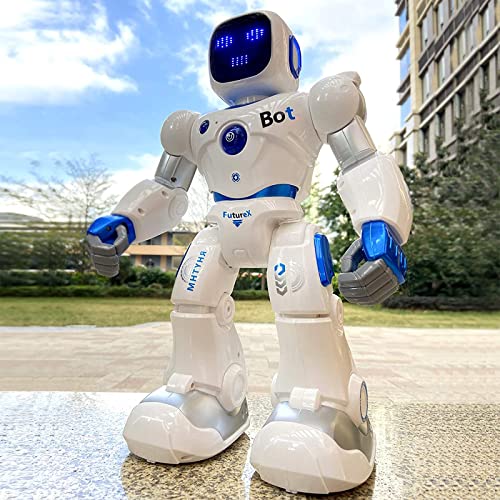
At 15.8 inches tall, this robot has a presence that makes it feel more like a playmate than a pocket toy. With up to 100 minutes of playtime on a full charge, kids can enjoy extended sessions without frequent recharges. The combination of remote control, app control, voice commands, and gravity-sensor mode lets children switch between direct driving and hands-free interaction as their attention shifts. That flexibility, plus 10 expressions and 9 moving joints, keeps playtime engaging and varied.
The trade-off is the charging routine: you must use the included original cable, and USB-C to USB-C cables simply won’t work. If the robot arrives unresponsive, the instructions say to charge it for 30 minutes first, which is a small hiccup but worth knowing before gift-giving. Compared to the Ruko 18011 Smart Robot Dog, which offers 30 LED expressions and touch sensor interaction, this 1088 model adds dance, gymnastics, storytelling, and music, giving it a wider range of activities for a child who enjoys both structured play and spontaneous fun.
Product photos
Ruko 18011 Smart Robot Dog
What We Like
- Programming mode builds early STEM skills
- Obstacle-avoidance sensors prevent crashes
- More than 30 animated LED expressions
Trade-offs
- 45-minute playtime needs 3-hour recharge
- Remote requires 2 AAA batteries not included
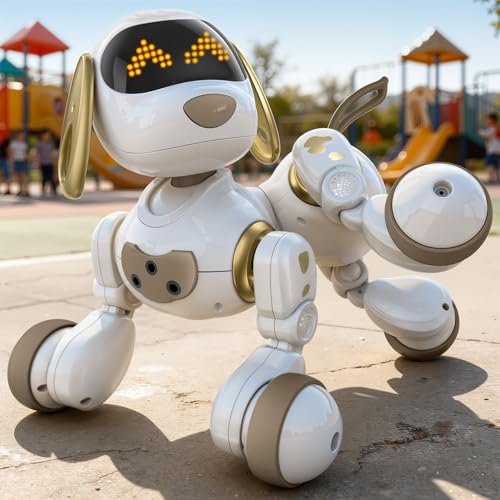
The trade-off? You trade longer run times for that emotional connection. At 45 minutes of active play before a 3-hour recharge, this dog prioritizes expression over endurance. For a child who already asks for a real puppy but isn’t ready for the mess, this gives them the personality without the cleanup.
Product photos
Sphero indi Student Kit
What We Like
- Screenless color tile coding
- Rechargeable with all-day battery
- Includes Challenge Cards and lessons
- Free Sphero Edu Jr app for customization
Trade-offs
- 10×10-inch footprint requires clear floor space
- No visual feedback from robot face or eyes
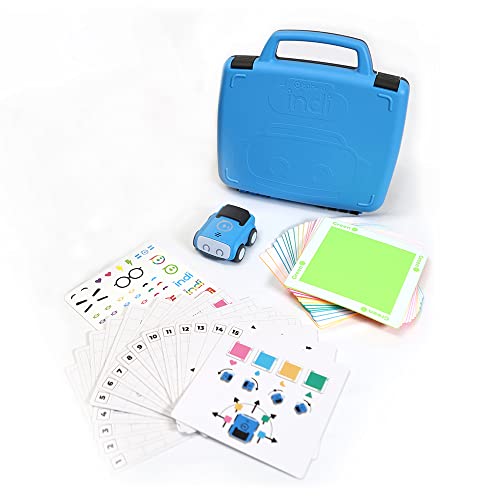
Coding starts with nothing but color tiles, no screen, no app required. A child can place colored squares to make the robot move, learning cause-and-effect and sequencing through physical play. At 0.8 pounds and with all-day rechargeable battery life, it’s light and durable for classroom use. The included Challenge Cards and standards-aligned lessons provide structured guidance while allowing open-ended exploration. This is a hands-on activity that builds computational thinking skills like color identification, sequencing, pattern recognition, and decomposition through interactive play.
The Sphero indi Student Kit teaches computational thinking concepts like color identification, sequencing, decomposition, pattern recognition, and cause-and-effect through tile placement, so kids learn logic and problem-solving without any screen time. The included Challenge Cards and standards-aligned lessons provide structured guidance while still allowing open-ended exploration, making it suitable for ages 4 and up. Reviewers note that the durable, rechargeable robot lasts all day, which keeps it ready for busy classrooms or multiple play sessions.
EduCuties Robot Toy
What We Like
- 60-minute playtime on a 2-hour charge
- Non-toxic ABS plastic construction
- Gesture and infrared remote control
- Programmable 50-action sequence playback
Trade-offs
- Infrared remote requires line of sight
- No app control or voice command option
- No obstacle avoidance in gesture mode
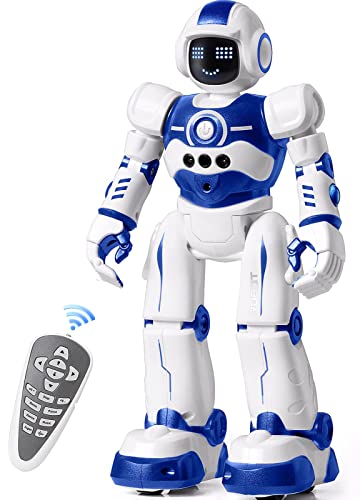
A 60-minute run time from a 2-hour USB charge means this robot stays in play longer than it sits on the charger, which matters when a child’s attention span finally locks onto something. The gesture control lets them steer it by waving their hand left, right, forward, or backward, and the programmable mode can repeat up to 50 actions you input one by one. The non-toxic ABS plastic and flexible joints in the shoulders, elbows, and thumbs are built for active play, and the bottom skating wheels are sturdy for various moves.
The trade-off shows up in the control method: infrared remote means you need to point it at the robot, so if a kid runs behind a sofa or turns the robot away, the signal drops. There’s also no app or voice command here, so the interaction stays physical and direct, which some parents will see as a plus for screen-free play. For families who want a straightforward, rechargeable robot with gesture control and basic programming, this is a sensible choice.
Product photos
VTech Switch and Go T-Rex Terrain Truck

What We Like
- One-touch transformation from truck to T-Rex
- Three easy steps to change back
- Lights and roaring sounds for play
- Compact 0.4 lb size for small hands
Trade-offs
- Demo battery only; fresh AAA needed for regular use
- Single vehicle; no interaction with other toys included
One-touch transformation turns this trail-blazing terrain truck into a towering T-Rex, so a 4-year-old gets the satisfaction of a full change without needing to handle tiny parts. Roaring engine sounds and lights add to imaginative play, and the driver’s voice and T-Rex roars amp up the excitement. That simplicity is exactly why this toy fits a child who wants dramatic play but hasn’t yet developed the patience for multi-step assembly. At 0.4 pounds, it’s light enough for small hands to carry, and its compact size makes it easy to tuck into a backpack or toy bin without losing pieces.
The VTech Switch and Go T-Rex Terrain Truck is a standalone creature vehicle. It doesn’t connect or interact with other toys out of the box, so the play stays solo unless you buy more Switch and Go sets separately. Compare that to the Ruko 1088 Smart Robot Toy, which offers remote and app control, but at 2.8 pounds it’s heavier. If your child loves transforming one thing into another and doesn’t need programmable features, the T-Rex Terrain Truck delivers that transformation cleanly. For families who want programmable interaction or group play, you’ll want to look at the larger robot options.
BAZOLOTA Programmable Robot
What We Like
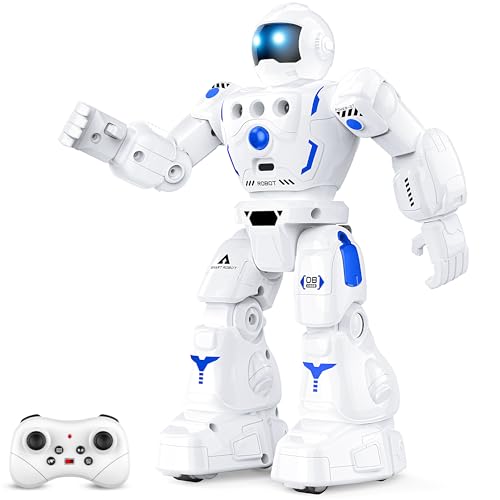
- Programs up to 50 user actions
- Rechargeable via USB, 60 min playtime
- Remote control works up to 98 feet
Trade-offs
- At 8 inches tall, easily lost under furniture
- No app control or voice command
A 50-action programmable memory means a 4-year-old can chain together moves like slide, dance, and story time without needing a phone or app. That turns cause-and-effect into a game. The remote control works from 98 feet away, so kids can command the robot from across the room. The built-in lithium battery gives a full hour of continuous play after a two-hour USB charge, so you’re not swapping batteries every afternoon.
At 8 inches tall and 2.9 inches wide, this robot is small enough to fit on a shelf or in a backpack. It lacks app or voice control, so if your child won’t have to navigate a phone interface. For families who want a straightforward programmable robot with storytelling, the BAZOLOTA delivers that without extra complexity.
Product photos
Tecpenda Mini Backpack Robot
What We Like
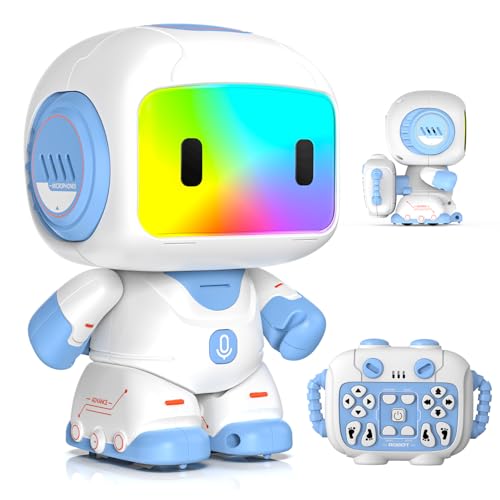
- Voice repeat with head touch
- Records and plays back 30 seconds
- Programs up to 20 actions
- 10 built-in songs and LED lights
Trade-offs
- Remote stores on back, not wrist strap
- No gesture or app control
The head-touch voice repeat is the standout here, tap the robot’s head and it mimics everything your child says in a playful robot voice while moving. That single feature turns a simple remote-control toy into a giggle machine for a four-year-old. It also records up to 30 seconds of your own voice, so parents can leave a silly message or a sweet goodnight. The programming mode lets kids chain up to 20 actions without any coding, which builds logical thinking without feeling like homework.
Size is the main consideration here. At 4.5 inches tall, this robot is small enough to vanish under a couch cushion or get carried off mid-play. It’s also remote-only, with no gesture or app control like the larger Ruko 1088 Smart Robot Toy, so the interaction stays close-range. But for pure, immediate laugh-out-loud fun at a tiny footprint, the Tecpenda delivers something bigger robots often miss: a personal, silly conversation partner that keeps a four-year-old’s attention.
Product photos
FunMission Mini RC Robot
What We Like
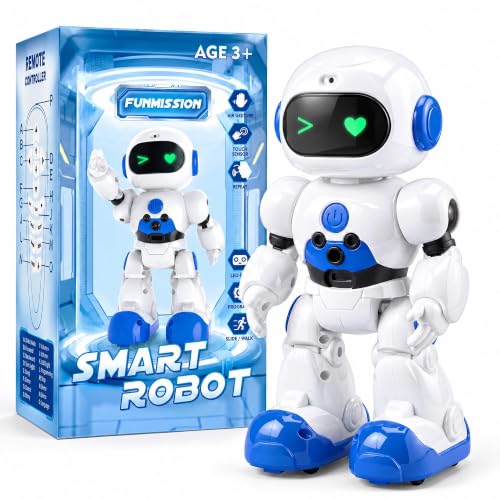
- Blow-to-giggle microphone interaction
- Gesture control for easy driving
- Voice recording and playback
- Programmable up to 50 actions
Trade-offs
- At 6.9 inches tall, smaller than some alternatives
- No app or screen-based coding option
- LED eyes lack the expression range of larger models
The microphone interaction is a playful feature: blowing on the microphone triggers a giggle, which is a simple cause-and-effect reaction that can engage young children. At 6.9 inches tall and rechargeable via USB, the robot fits easily in small hands and recharges without needing replacement batteries. Gesture control lets kids guide the robot forward, backward, left, or right with hand movements, and the included remote offers an alternative way to drive. Voice recording and playback add another interactive layer, making this a screen-free toy that focuses on immediate reactions rather than complex programming.
Size and depth are the main trade-offs. Compared to the Ruko 1088 Smart Robot, which stands 15.8 inches tall, the FunMission Mini is noticeably smaller. It also lacks app-based coding or a visual programming language, so the programmable actions, up to 50 steps stay purely on-device. For a child who enjoys surprise reactions and simple cause-and-effect play, this robot offers those features. For someone wanting a larger floor robot or coding experience beyond the device, other options in this guide may be more suitable.
Product photos
KingsDragon RC Smart Robot Toy

What We Like
- Rechargeable via USB, no batteries needed
- Blue LED eyes light up when moving
- Gesture control via hand commands
Trade-offs
- Infrared remote requires line-of-sight to work
- No app or voice control option
A 60-minute playtime on a two-hour charge means this robot stays in action long enough for a solid afternoon of play without constant recharging. The gesture control is a key feature: kids wave their hand left, right, forward, or back, and the robot follows. It also records up to 50 actions inputted by the user, so a four-year-old can teach it a simple dance sequence and watch it repeat back. That kind of cause-and-effect feedback is exactly what builds early problem-solving confidence.
The infrared remote control is the trade-off here. It needs a clear line of sight to work, so if your child wanders behind the couch or turns the robot away, the signal drops. The KingsDragon is 10.4 inches tall, so it has a modest floor presence. For a four-year-old who loves the magic of commanding something with a wave, the gesture mode is where this toy shines. It’s a focused, affordable pick for that specific kind of interactive play.
Product photos
Cretargio Interactive Robot Dog

What We Like
- Touch-activated head for lifelike reactions
- USB rechargeable, no battery swaps
- Remote control for forward/backward and dance
- Safe, durable ABS plastic build
Trade-offs
- Remote requires 2 AAA batteries (not included)
- No programmable or coding features for older kids
The touch-activated head is the key feature here: a gentle pat makes this robot dog sit, bark, or wag its tail, giving a young child immediate feedback without needing to master the remote. That direct cause-and-effect sparks imaginative play at this age, and the USB rechargeable battery means you are not hunting for replacements every week. For a child who wants a responsive pet-like companion rather than a coding challenge, this delivers a simple, warm interactive experience.
The Cretargio robot dog is a straightforward toy, not a programmable robot. If your child is already curious about sequencing or building logic, the Ruko 1088 offers app and voice control that can grow with them. But for a child who just wants a pet that reacts to touch and dances on command, the Cretargio delivers exactly that. Just remember to grab two AAA batteries for the remote before the box is opened.
Product photos
How We Evaluated Robot Toys For 4 Year Olds
We started with the hard specs: battery life, charge time, size, weight, and control methods. A robot that dies in 20 minutes or requires a three-hour recharge isn’t going to hold a preschooler’s attention. We cross-referenced manufacturer data with patterns in owner feedback to see which claims held up in real living rooms. We also looked at expert round-ups from child development and toy industry sources to understand what skills each toy actually targets.
Three criteria mattered most. Battery life and recharge convenience came first. A robot that needs new AAAs every week or takes hours to recharge creates friction for parents. Control method variety came second: four-year-olds have different fine motor skills and patience levels, so we prioritized toys with multiple ways to play (remote, gesture, app, voice). Durability and safety came third, non-toxic materials, no sharp edges, and a weight that won’t hurt if dropped on a toe.
This is a research-led evaluation based on published specs, expert analysis, and the patterns we saw in hundreds of owner experiences. We haven’t tested these in a lab or lived with each one for weeks. But by comparing what manufacturers promise against what families actually report, we can tell you which toys are most likely to deliver a good experience. We can also tell you which ones have trade-offs you need to know about before buying.
What To Look For In Robot Toys For 4 Year Olds
The right robot for a four-year-old balances independence with simplicity. You want something they can operate on their own after a short demo, but that also has enough depth to grow with them for more than a week.
A robot that is rechargeable via USB, has at least one easy control method (gesture or remote), and is built from non-toxic materials with no small parts.
Battery and Charge Cycle
Four-year-olds don’t understand “it needs to charge for three hours.” Look for a robot that gives at least 45 minutes of play per charge and recharges in under two hours. USB rechargeable is ideal, you don’t want to be buying AAAs every other week. Some robots come with demo batteries that need immediate replacement; check the fine print so you aren’t disappointed on birthday morning.
Control Method and Complexity
At this age, fine motor skills vary wildly. Some kids can handle a two-stick remote; others need gesture control or simple button presses. The best robots offer at least two ways to play, remote control for when you want to direct the action, and a simpler mode (touch, voice, or gesture) for independent play. Avoid robots that require app pairing with complex Bluetooth steps; that’s a frustration for both of you.
Safety and Durability
Four-year-olds drop things, throw things, and occasionally use toys as stepping stools. Look for non-toxic ABS plastic construction is the standard. Avoid robots with delicate limbs or small parts that can snap off or be swallowed. A weight under 3 pounds is easier for small hands to carry and less likely to cause damage if it’s knocked off a table.
Programmability and Expandability
- Check if the robot has some form of programmability, even if it’s just a sequence of 10 actions, so the child can feel like they’re controlling the toy, not just pressing buttons
- Verify the robot uses standard USB-C charging cable, not a proprietary cable that’s hard to replace
- Confirm the control range: infrared remote needs line of sight; it won’t work through walls or across the room
A good rule of thumb: if you can’t figure out the basic operation from the box art and a quick glance at the manual, your four-year-old won’t either.
Robot Toys For 4 Year Olds Compared
The table below lines up the key specs of all ten robots side by side, so you can compare battery life, control methods, and size at a glance.
| Product | Height | Playtime | Control Options |
|---|---|---|---|
| Ruko 1088 Smart Robot Toy | 15.8 inches | 100 minutes | Remote, app, voice, gravity-sensor |
| Ruko 18011 Smart Robot Dog | 9.8 inches | 45 minutes | 2.4GHz Remote & Gesture Control |
| Sphero indi Student Kit | 2.5 inches | all-day life | color tile coding (screenless) |
| EduCuties Robot Toy | 10.6 inches | 60 minutes | Remote & gesture |
| VTech Switch and Go T-Rex Terrain Truck | 4.5 inches | N/A | one-touch button |
| BAZOLOTA Programmable Robot | 8.0 inches | 60 minutes | Gesture Sensing |
| Tecpenda Mini Backpack Robot | 5.5 inches | 120 minutes | 2.4G remote control |
| FunMission Mini RC Robot | 6.9 inches | N/A | Gesture + remote |
| KingsDragon RC Smart Robot Toy | 10.4 inches | 60 min | Remote & hand gesture |
| Cretargio Interactive Robot Dog | 9.0 inches | N/A | Remote Control |
Frequently Asked Questions
What is the best robot toy for a 4 year old who has never used a robot before?
The Ruko 1088 Smart Robot Toy is the best starting point because it offers four control methods: remote, app, voice, and tilt. That way a child can start with the simplest mode and graduate to more advanced ones. Its 15.8-inch size also makes it easy to see and track, which helps a young child feel in control.
Are robot toys for 4 year olds educational?
Yes, many robot toys build early STEM skills like sequencing, cause and effect, and spatial reasoning. The Sphero indi teaches screenless coding through color tiles, while the Ruko 18011 Robot Dog includes a programming mode that introduces logic. For more options, our educational toys for 4 year olds guide covers learning-focused picks.
How long should a robot toy’s battery last for a 4 year old?
Look for at least 45 minutes of continuous playtime. The Ruko 1088 offers 100 minutes, which is excellent. Shorter battery life means more frustration when the toy dies mid-play, and longer recharge times mean more waiting. USB rechargeable robots are far more convenient than those requiring disposable batteries.
What is the difference between gesture control and remote control?
Gesture control lets a child command the robot by waving their hand in front of sensors, it feels like magic and requires no fine motor skill. Remote control uses a physical controller with buttons or joysticks, which gives more precise direction but requires better hand-eye coordination. The EduCuties Robot Toy offers both, making it a good transition toy.
Can a 4 year old learn coding from a robot toy?
Yes, but it depends on the toy. The Sphero indi uses screenless color tile coding, a child places colored tiles on the floor to tell the robot where to go, which teaches sequencing without a screen. The BAZOLOTA and KingsDragon robots let kids program up to 50 action sequences using the remote, introducing logic through play. For a broader look at what builds these skills, check our guide to building toys for 4 year olds.
The Bottom Line
The Ruko 1088 Smart Robot Toy is our best overall because it combines a generous 15.8-inch size, 100 minutes of play per charge, and four control methods. Those options let a child grow into the toy at their own pace. It’s the robot that will still be getting played with six months from now, not stuffed in a closet.
For families on a budget, the EduCuties Robot Toy delivers gesture control and programmable sequences at a more accessible price point without sacrificing rechargeable convenience. If you want a screen-free coding introduction, the Sphero indi is unmatched in its category.
The single most important thing to get right: match the control method to your child’s current fine motor ability. A robot that’s too hard to operate will sit untouched. A robot that’s too simple will be abandoned. Find the one that lets them feel like they’re in charge, that’s the one they’ll love.
