
10 Best Electronic Toys For Kids in 2026
This post contains affiliate links. As an Amazon Associate, we earn from qualifying purchases.
For toddlers building their first words, the LeapFrog Scout and Violet 100 Words Book is the best overall pick, offering bilingual English and Spanish audio with sound effects and fun facts on every page. The Fisher-Price Laugh & Learn Crawl Around Car is our top choice for infants, while the Snap Circuits Beginner SCB-20 leads for early STEM learning.
The challenge with electronic toys is finding ones that actually teach rather than just flash lights. You want something that grows with your child, matches their developmental stage, and doesn’t require a tablet or screen time to deliver real learning value.
This guide is based on research into manufacturer specifications, expert round-ups on child development through play, and patterns in owner feedback across hundreds of reviews. We focused on durability, educational value, age-appropriateness, and whether each toy genuinely engages a child beyond the first few minutes.
Top 10 Electronic Toys For Kids in the Market
Certain content that appears on this site comes from Amazon. This content is provided "as is" and is subject to change or removal at any time.
The Best Electronic Toys For Kids, Reviewed
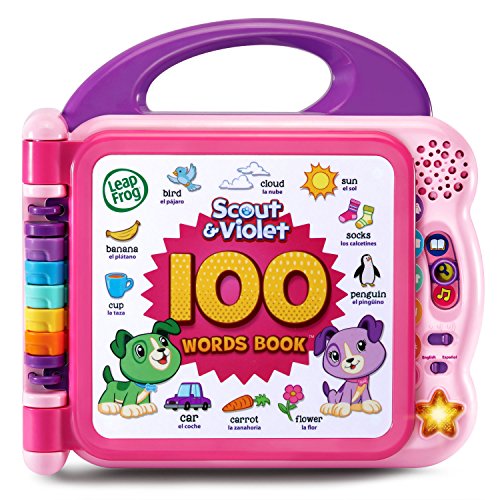
LeapFrog Scout and Violet 100 Words Book
What We Like
- Bilingual English & Spanish audio
- 100+ words chosen by learning experts
- Sound effects and fun facts on touch
- Light-up star button plays songs
Trade-offs
- Batteries included only for demo use
- Limited to word categories, no math or logic
With over 100 age-appropriate words selected by learning experts, this interactive book gives toddlers a head start on vocabulary in both English and Spanish. Touching each page triggers the word, a sound effect, and a fun fact, so a tap on “dog” barks and tells you something new. The light-up star button adds the Learning Friends theme song and a “My Favorite Word” feature, keeping little hands engaged without a screen. It is intended for ages 18+ months and requires 2 AA batteries, which are included for demo purposes only.
The trade-off is that this book is laser-focused on vocabulary, there’s no math, logic, or problem-solving built in. If your child is already beyond basic word recognition, the VTech Play Smart Preschool Laptop offers more varied activities like counting and letter games. But for toddlers building first words and bilingual skills, the 100 Words Book delivers simple, repeatable, bilingual learning that rewards curiosity with sound and song. Just remember to swap in fresh AA batteries after the demo ones run out.
LeapFrog 2-in-1 LeapTop Touch

What We Like
- Flipping screen converts to tablet mode
- Keyboard covers A–Z and 1-10
- Five learning modes: ABCs, numbers, games, music, messages
- Customizable to spell child's name
Trade-offs
- Batteries included only for demo; new ones needed
- Screen is not a real touchscreen, just a flip panel
A keyboard that flips into a tablet means a toddler gets two play modes in one compact 1.3-pound package, no separate devices cluttering the playroom. The LeapFrog 2-in-1 LeapTop Touch covers letters A–Z and numbers 1-10 across five learning modes. So a child can cycle through ABCs, number games, music, pretend messages, and even see their own name spelled out when a parent customizes it. That mix of role-play (emailing Scout like mom and dad) and structured learning makes it a natural fit for preschoolers who want to mimic grown-ups while building early literacy skills.
The flip panel is not an interactive touchscreen, it simply changes the layout from keyboard to tablet mode. For a 2-year-old exploring cause and effect, that’s fine, but a child used to a real tablet might notice the difference. Compared to the VTech Play Smart Preschool Laptop, which offers a different form factor, the LeapTop’s convertible design saves space but may not suit kids who expect a dedicated display area. Best for families who want a single, portable toy that grows with a toddler’s shifting play preferences.
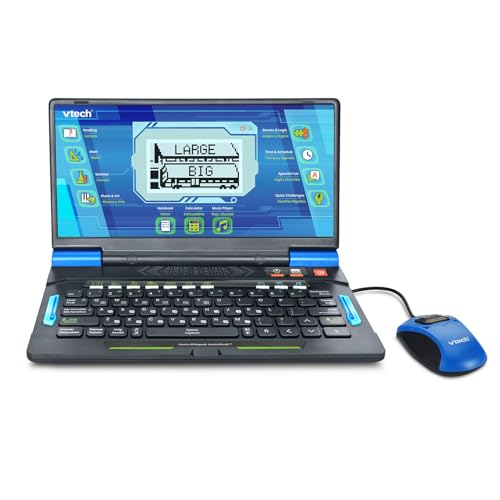
VTech Genio Bilingual JuniorBook Learning Laptop
What We Like
- Full-size QWERTY keyboard builds typing skills
- Over 80 pre-loaded offline activities
- Fully bilingual in English and Spanish
- No internet connection needed
Trade-offs
- Requires 4 AA batteries for regular use
- No internet means no content updates
Over 80 pre-loaded activities mean this laptop keeps a 5-year-old busy without ever needing Wi-Fi. That’s a huge plus for parents who want screen time that’s educational and completely offline. The full-size QWERTY keyboard helps kids build real typing skills, while the bilingual design lets them switch between English and Spanish on every activity. It’s a strong pick for families looking to introduce a second language early without adding another subscription or device to manage.
You’re stuck with what’s on the machine, no new apps or updates down the road. Compared to the VTech Play Smart Preschool Laptop, which is smaller and lighter at 1.2 pounds, this Genio model is bulkier (1.9 pounds) and more of a desk toy than a travel companion. If your kid is ready for a grown-up feel and you want language immersion, this is the one. If portability matters more, the Play Smart might suit you better.
Snap Circuits Beginner SCB-20 STEM Electronics Toy

What We Like
- Childproofed circuits for ages 5+
- 21 step-by-step projects included
- Color-changing fan adds excitement
- Award-winning STEM kit design
Trade-offs
- No advanced components for older kids
- Projects are finite with limited replay
The snap-together pieces and extra childproofing mean a five-year-old can safely build a working circuit without frustration. With 21 projects that teach troubleshooting and planning, this kit turns abstract electronics into something they can see and touch. It’s ideal for curious kids who want to understand how switches and lights work, and the color-changing fan gives each build a satisfying payoff. The included manual uses age-appropriate diagrams, so parents don’t need an engineering degree to help.
With 21 unique projects, this kit offers a structured introduction to circuits. But once those are completed, replay value depends on a child’s creativity. For a child just starting out, the frustration-free snap-together design is ideal, while older kids who already understand basics might prefer a more open-ended kit like the Butterfly EduFields 10in1 STEM Robotics Kit, which targets ages 8-12.
Fisher-Price Laugh & Learn Crawl Around Car

What We Like
- 3 ways to play as baby grows
- Smart Stages with 120+ songs and phrases
- Interactive dashboard with lights and sounds
- Built-in shape-sorting ramp with 3 balls
Trade-offs
- At 11 pounds, it's not portable for travel
- Large footprint needs dedicated floor space
Three distinct play modes mean this car-shaped activity center grows with your child from sitting up to crawling and eventually standing and cruising around. The Smart Stages technology packs over 120 songs, sounds, and phrases that introduce shapes, colors, the alphabet, numbers, and opposites, so every stage offers fresh content without you needing to buy add-ons. The interactive dashboard rewards little hands with lights and music when they steer, shift gears, turn the key, honk the horn, or flip the turn signals. It’s designed for babies who are ready to explore cause and effect while building gross motor skills, and the built-in shape-sorting ramp with three balls adds a classic hands-on challenge that keeps playtime varied.
At 28.7 inches long and 11 pounds, this is a floor-based activity center, not something you can easily carry in a bag like the LeapFrog 100 Words Book. It needs a clear area of floor space, and moving it between rooms takes two hands. The car is designed for babies from sitting up to standing and cruising, so it stays put while your little one grows.
Product photos
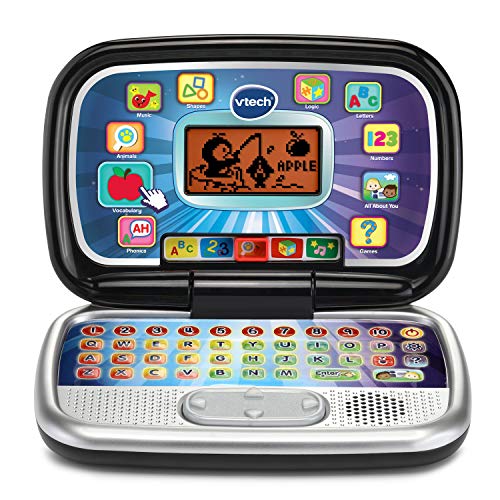
VTech Play Smart Preschool Laptop
What We Like
- 30 leveled learning activities
- Personalizes with name, age, avatar
- Introduces Spanish words, letters, numbers
- Lightweight at 1.2 pounds
Trade-offs
- Batteries included only for demo use
- No activities for children older than 6
Thirty built-in activities with leveled learning mean this little laptop grows with your child from letter recognition to logic games, all without needing a Wi‑Fi connection or a recharge. It personalizes with a name, age, and avatar, so a three‑year‑old feels like they have their own grown‑up device. For families on a budget who still want a structured introduction to letters, numbers, Spanish words, and even animal sounds, this is the kind of toy that keeps a preschooler engaged without overwhelming them.
Those 30 activities are all inside the unit, there’s no app store, no internet, and no way to add new content later. If your child is already reading simple words or asking for more advanced challenges, this may feel limited by age six. For the price, though, you’re getting a focused, no‑distractions learning tool that delivers exactly what it promises.
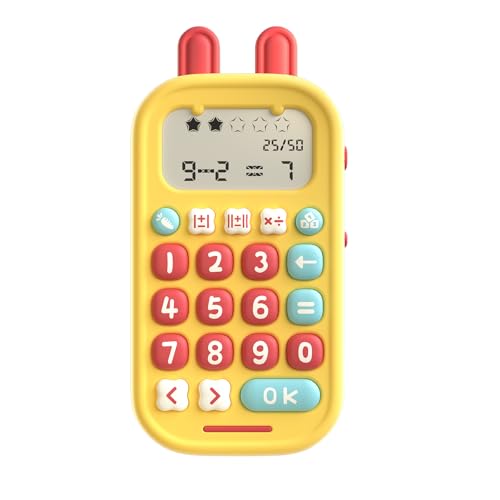
alilo Math Games Portable Toy
What We Like
- 19 math games for varied skill levels
- Instant voice encouragement and star rewards
- Error check and correction for self-paced learning
- Portable with lanyard and silent mode
Trade-offs
- No physical buttons beyond the keypad for tactile feedback
- No touchscreen or color display for visual learners
The catch is that this is a dedicated math device, not a general-purpose tablet. Kids who expect colorful animations or touchscreens might find the simple keypad and voice feedback old-school compared to the JoyCat Kids Learning Tablet, which covers multiple subjects with 600+ words and interactive games. But for parents whose main goal is sharpening math skills through repetition and error correction, especially during travel, the alilo’s portability and 50K-question library make it a focused, durable choice that won’t distract with videos or apps.
Product photos
JoyCat Kids Learning Tablet
What We Like
- Screen-free design reduces visual stress
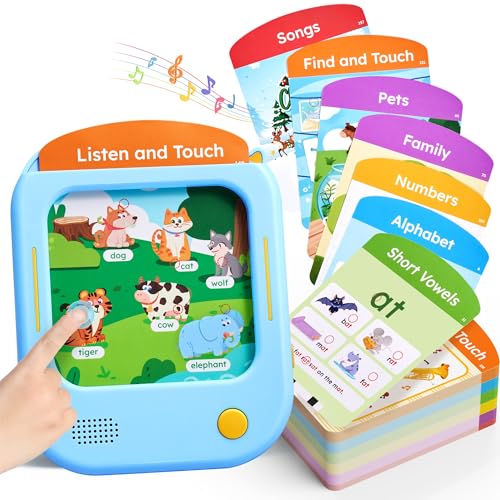
- 156 pages of FSC-certified talking flash cards
- Covers phonics, vocabulary, math, and songs
- Self-directed learning with interactive games
Trade-offs
- Requires inserting cards one at a time
- No screen means no video or animation feedback
- Limited to audio-based interaction only
With 156 talking flash cards and over 600 words across 40+ themes, this tablet turns phonics practice into a hands-on, screen-free experience. That means your child can press, insert, and tap their way through letter sounds, short vowels, word building, and even math, all without staring at a glowing display. Designed for ages 2 to 5, it gives parents a structured, self-directed learning tool that builds foundational reading skills through audio and tactile play.
The interaction is purely audio and card-based, no videos, animations, or touchscreen feedback. Compared to the LeapFrog 2-in-1 LeapTop Touch, which offers a laptop form factor, the JoyCat relies on card insertion for each activity. But if your priority is a focused, phonics-first approach that keeps eyes off screens and hands on cards, this is a thoughtful alternative that delivers exactly what it promises.
Product photos
Fisher-Price Smart Stages Chair

What We Like
- 120+ songs, sounds and phrases
- Interactive seat activates on sit/stand
- 3 Smart Stages learning levels
- Busy activities: flipbook, remote, hidden surprises
Trade-offs
- At 4.4 lb, less portable for travel
- Max weight 55 lb limits older toddlers
- Requires floor space for chair setup
With 120+ songs, sounds and phrases packed into a single chair, this toy keeps little ones engaged through music and lights while they learn. The interactive seat rewards sitting down and standing up with phrases and sounds, turning every movement into a learning moment. It’s ideal for toddlers starting to explore cause and effect and building fine and gross motor skills. The three Smart Stages levels grow with your child, introducing colors, shapes, numbers, counting, and opposites at the right pace.
This chair weighs 4.4 pounds, so it’s not something you toss in a diaper bag like the LeapFrog Scout and Violet 100 Words Book. But for a stationary play station at home, that heft means it stays put during active play. The flipbook, light-up pretend TV remote, and lift-up seat cushion with hidden surprises give hands-on variety that a simple book can’t match. Best for families who want a dedicated learning chair that grows with their toddler from age one onward.
Product photos
Butterfly EduFields 10in1 STEM Robotics Kit
What We Like
- Builds in 15 minutes with clear instructions
Trade-offs
- Ages 8-12 only; too complex for younger kids
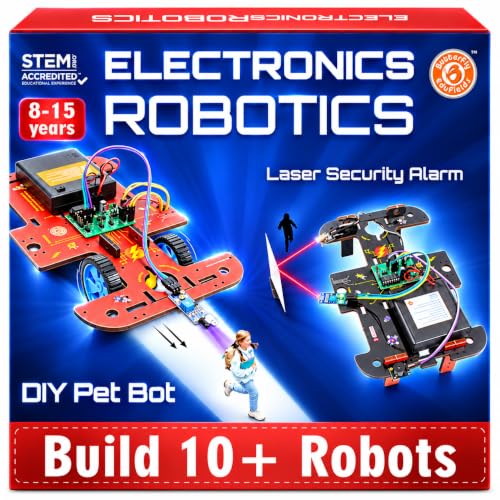
The illustrated manual breaks each build into clear steps, so a child can finish one project in about 15 minutes and feel a real sense of accomplishment before moving to the next.
Those small wires and connectors demand patience and a steady hand, which means younger kids or easily frustrated builders might need an adult nearby to help. Compared to the Snap Circuits Beginner set, which uses larger snap-together pieces for ages 5-9, this kit offers more variety and challenge but requires more dexterity. If your child is ready to explore robotics, this kit gives them the tools to build and learn, just clear a table and allow time for assembly.
Product photos
How We Evaluated Electronic Toys For Kids
We started by examining the specs and learning claims from each manufacturer, then cross-referenced those with expert round-ups on developmental milestones and play-based learning. Owner feedback patterns helped us spot which toys hold up to daily use and which features parents actually praise versus ignore.
Four criteria mattered most for this category. First, age alignment, a toy must match the child’s motor skills and attention span, not just the label on the box. Second, learning depth, we looked for toys that teach multiple skills (letters, numbers, bilingual vocabulary, problem-solving) rather than single-trick gadgets. Third, durability, electronic toys take abuse, so we prioritized reinforced construction and battery compartments that survive toddler hands. Fourth, replay value, the best toys offer multiple modes, progressive difficulty, or new discoveries over weeks of use.
An evaluation based on research has limits. We rely on documented specs, expert consensus, and the collective experience of thousands of parents. For deeper dives into specific categories, explore our guides on best educational toys and STEM toys.
What To Look For In Electronic Toys For Kids
The right electronic toy feels like a playmate, not a teacher. Look for features that respond to the child’s actions, offer progressive challenges, and avoid the trap of passive entertainment.
Choose electronic toys that match your child’s current developmental stage, offer multiple modes or difficulty levels, and prioritize screen-free interaction. Look for durable construction, clear audio, and batteries that aren’t hidden behind tiny screws.
Age-Appropriate Design
A toy labeled for 18 months should not require fine motor skills a 2-year-old hasn’t developed yet. The LeapFrog Scout and Violet 100 Words Book works for toddlers because each page has a simple touch sensor that responds to a finger press, not a precise button push. For infants, the Fisher-Price Laugh & Learn Crawl Around Car uses Smart Stages technology that adjusts songs and phrases as the baby grows from sitting to standing.
Learning Modes and Depth
The best electronic toys teach multiple subjects through different modes. The LeapFrog 2-in-1 LeapTop Touch covers ABCs, numbers, games, music, and messages in one device, and even customizes to spell the child’s name. The VTech Genio Bilingual JuniorBook Learning Laptop offers over 80 pre-loaded offline activities in English and Spanish, building typing skills on a full-size QWERTY keyboard. Compare these to single-function toys that only play songs or flash lights, the multi-mode options keep a child engaged longer.
Screen-Free Interaction
Many parents want the educational benefits of electronics without adding screen time. The JoyCat Kids Learning Tablet uses talking flash cards with 156 pages of audio content but no screen at all, reducing visual stress while teaching phonics and vocabulary. The alilo Math Games Portable Toy is another screen-free option, offering 19 math games with voice encouragement and error correction. For a broader look at screen-free options, check our guide on electronic vs traditional toys.
Durability and Safety
Electronic toys get dropped, thrown, and chewed. Look for reinforced battery compartments that require a screwdriver to open, this prevents little hands from accessing batteries. The Snap Circuits Beginner SCB-20 uses childproofed circuits with color-coded pieces that snap together without soldering or tools. The Butterfly EduFields 10in1 STEM Robotics Kit builds in 15 minutes with clear instructions, but its small parts mean it’s only suitable for ages 8 and up.
- Check that volume controls are accessible and have a low setting
- Confirm batteries are included for demo use and know what type you’ll need to buy
- Look for toys with a silent or mute mode for car rides and quiet time
- Verify that all small parts are secured and can’t be pulled off by a younger sibling
- Read the cleaning instructions before buying, some electronic toys can’t be wiped down with standard cleaners
A good rule of thumb: if the toy needs more batteries than it has learning modes, keep looking.
Electronic Toys For Kids Compared
The table below compares all ten electronic toys by age range, key features, and what each one does best, so you can find the right match for your child’s current stage.
| Product | Age Range | Weight | Dimensions |
|---|---|---|---|
| LeapFrog Scout and Violet 100 Words Book | 18+ months | 1.5 pounds | 9.4" x 9.4" x 1.9" |
| LeapFrog 2-in-1 LeapTop Touch | 2-5 years | 1.3 pounds | 2.0 x 10.1 x 6.0 inches |
| VTech Genio Bilingual JuniorBook Learning Laptop | 5+ years | 1.9 pounds | L 11.3 inches, W 7.5 inches, H 7.5 inches |
| Snap Circuits Beginner SCB-20 STEM Electronics Toy | 5-9 years | 0.5 pounds | 11.7 x 2.0 x 7.4 inches |
| Fisher-Price Laugh & Learn Crawl Around Car | 6 months to 3 years | 11.0 pounds | 28.7 x 18.9 x 12.6 inches |
| VTech Play Smart Preschool Laptop | 3-6 years | 1.2 pounds | 9.3 x 6.2 x 2.2 inches |
| alilo Math Games Portable Toy | 5-12 | 0.4 pounds | 5.7 x 2.9 x 0.1 inches |
| JoyCat Kids Learning Tablet | 2-6 year | 1.5 pounds | 5.5 inches, W 7.3 inches, H 0.0 inches |
| Fisher-Price Smart Stages Chair | 1+ years | 4.4 pounds | 13.2 x 16.9 x 16.1 inches |
| Butterfly EduFields 10in1 STEM Robotics Kit | 8-12 years | 0.9 pounds | L 7.9 inches, W 3.9 inches, H 0.8 inches |
Frequently Asked Questions
What is the best electronic toy for a 1-year-old?
The Fisher-Price Laugh & Learn Crawl Around Car is ideal for infants starting at 6 months. It offers three ways to play as the baby grows, with Smart Stages technology that delivers over 120 songs and phrases. The interactive dashboard, lights, and shape-sorting ramp keep little hands busy while encouraging movement.
Are electronic toys bad for toddlers?
Not when used in moderation and chosen thoughtfully. Screen-free electronic toys like the JoyCat Kids Learning Tablet or the LeapFrog Scout and Violet 100 Words Book provide interactive learning without passive screen time. The key is selecting toys that require active participation rather than just watching lights and sounds.
What is the best electronic toy for learning to read?
The LeapFrog Scout and Violet 100 Words Book is excellent for building first words and vocabulary, especially with its bilingual English and Spanish audio. For phonics practice, the JoyCat Kids Learning Tablet covers 156 pages of talking flash cards focused on letter sounds and early reading skills without a screen.
What age should a child start using electronic learning toys?
Most electronic learning toys are designed for children 18 months and up, though some like the Fisher-Price Laugh & Learn Crawl Around Car start at 6 months. The key is matching the toy’s complexity to the child’s fine motor skills and attention span. For preschoolers, the VTech Play Smart Preschool Laptop offers 30 leveled activities starting at age 3.
Can electronic toys replace traditional toys?
Electronic toys work best alongside traditional toys, not as replacements. Building blocks, art supplies, and physical play develop different skills than electronic learning tools. The best approach combines both, using interactive toys for focused learning sessions and traditional toys for open-ended creative play.
The Bottom Line
The LeapFrog Scout and Violet 100 Words Book earns the best overall spot because it delivers genuine bilingual learning in a format that toddlers can use independently. The touch-sensitive pages, expert-chosen vocabulary, and light-up star button keep children engaged without requiring a parent to sit beside them the whole time.
If your budget is tighter, the VTech Play Smart Preschool Laptop offers 30 leveled activities for a fraction of the cost. For families with an infant, the Fisher-Price Laugh & Learn Crawl Around Car grows from sitting to cruising with Smart Stages content that adapts to your baby’s development.
The single most important factor is age alignment. A toy that matches your child’s current abilities will teach more and frustrate less than one aimed too high or too low. Start with where they are now, and the learning will follow.
