
10 Best Building Toys For Kids With Tech Features in 2026
This post contains affiliate links. As an Amazon Associate, we earn from qualifying purchases.
The INSOON 5 in 1 Robot Building Toy wins as the best overall because it packs five build options, a 680 RPM motor, and both app and remote control into a single kit. For a screen-free coding start, the Teach Tech Mech-5 Coding Robot Kit teaches logic through a mechanical wheel. The Snap Circuits Flight Deck STEM Toy earns top marks for kids who love launching paper airplanes while learning circuits and aerodynamics.
Parents shopping for building toys with tech features often face a tricky balance: the toy needs enough digital interactivity to hold a kid’s attention, but not so much that the building itself becomes an afterthought. The best sets use app control, coding, or motorized motion to extend the play value of a physical construction project.
This guide ranks ten kits based on manufacturer specifications, expert round-ups, and patterns in owner feedback. We focused on build quality, educational depth, age fit, and the type of tech feature each toy offers so you can match the right set to your child’s interests.
Top 10 Building Toys For Kids With Tech Features in the Market
Certain content that appears on this site comes from Amazon. This content is provided "as is" and is subject to change or removal at any time.
The Best Building Toys For Kids With Tech Features, Reviewed
INSOON 5 in 1 Robot Building Toy

What We Like
- 5 build options in one kit
- 680 RPM motor for speed
- App and remote dual control
- Rechargeable battery included
Trade-offs
- 15-20 minute runtime per charge
- Builds one model at a time
A 680 RPM motor with 2.5 kg·cm torque means this tracked robot accelerates faster than most building kits in its class, enough to scramble across carpet or tile without bogging down. Five build options (robot, tank, jet, triceratops, ATV) from a single 795-piece set give a kid who loves variety plenty of reasons to rebuild. The app control adds path-following and programming modes, so it grows with a child’s interest from simple driving to basic coding logic. It balances raw performance with creative flexibility for a wide range of play styles.
The trade-off is runtime: 15-20 minutes per charge means you’ll want to keep the USB cable handy during longer play sessions. But the INSOON’s rechargeable battery and included charger save you from buying disposables, and the anti-slip treads keep it stable on rough ground. Best for a kid who wants speed, variety, and app-based control in one box, not ideal for marathon play sessions without a charging break.
Product photos
Snap Circuits Flight Deck STEM Toy

What We Like
- Five unique STEM projects included
- Teaches circuits, motors, and aerodynamics
- No extra tools needed
- Award-winning Snap Circuits brand
Trade-offs
- Batteries required but not included
- Limited to paper airplane and ball launching
Five distinct projects in one kit let kids build a working paper airplane launcher, a flying saucer launcher, a ball launcher, a spinning art wheel, and a fan that levitates balls. That variety means a single purchase covers circuits, motors, motion, and aerodynamics without needing extra modules. It’s ideal for a child who wants to understand how electricity and physics make things fly, spin, or hover, and the step-by-step directions let them work independently once they can follow a diagram.
Batteries aren’t included, so you’ll need to grab some before the first launch. Compared to the Snap Circuits 203 Electronics Kit with its 200+ projects and 42 snap modules, the Flight Deck is laser-focused on hands-on aerodynamics and motion. That makes it perfect for a young engineer who loves paper airplanes and wants to see the science behind the flight, not a general electronics lab.
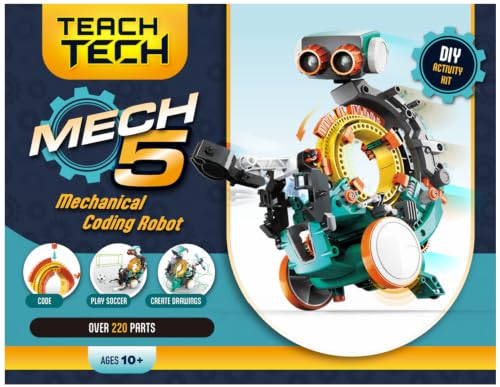
Teach Tech Mech-5 Coding Robot Kit
What We Like
- Mechanical coding wheel teaches coding basics
- Mission-based entry-level STEM project
- Detailed step-by-step assembly instructions
Trade-offs
- Multiple hours of build time required
- No app or remote control included
A mechanical coding wheel that you snap buttons onto to program movement, that’s the core idea here, and it’s refreshingly screen-free. The Mech-5 can throw, lift, kick, and draw, all driven by your kid’s own button arrangement. For a first coding robot, it skips the app complexity and focuses on mechanical logic, which suits future engineers who learn best by building something with their hands. The assembly takes a few hours, so expect a rewarding weekend project rather than instant play.
There’s no app or remote control, so once the coding wheel is set, the robot runs its sequence without real-time interaction. Compare that to the INSOON 5 in 1 set, which offers both app and remote control for more dynamic play. The Mech-5 is better suited for a child who wants to understand the ‘why’ behind the motion, not just the ‘how’ of pressing buttons. It’s a deliberate, methodical introduction to coding, not a flashy toy.
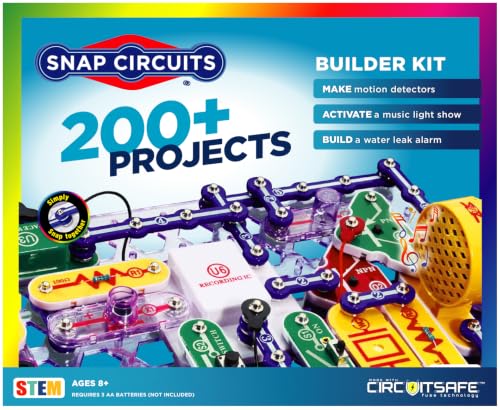
Snap Circuits 203 Electronics Kit
What We Like
- 42 snap modules for 200+ projects
- Full-color project manual included
- No extra tools needed
- Award-winning educational design
Trade-offs
- At 2.2 lb, less portable than some kits
- No app or remote control features
With 42 snap modules and over 200 projects packed into one kit, this is the kind of set that keeps a curious 8-year-old busy for months. You build everything from burglar alarms to doorbells, and the numbered, color-coded pieces snap onto the included grid without any extra tools. It’s a safe, hands-on introduction to electrical engineering that rewards patience and experimentation.
This kit is purely manual, no app, no remote control, no coding element. If your child is drawn to robots that move or respond to a phone, something like the INSOON 5 in 1 Robot Building Toy offers that interactive tech. But if you want a deep, screen-free dive into how circuits actually work, the Snap Circuits 203 delivers a huge variety of projects for the price.
Product photos
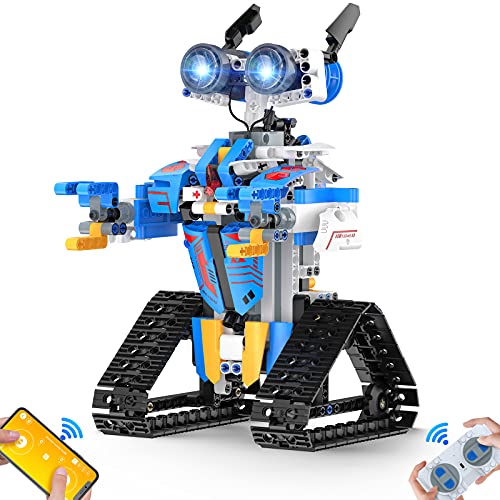
Henoda Robot Building Block Kit
What We Like
- 468+ pieces with cool stickers
- Glowing eyes and flexible joints
- Step-by-step manual with red markers
Trade-offs
- Only one build model from the set
- No rechargeable battery mentioned
The glowing eyes and rotating arm joints add a little personality that keeps it from feeling like just another brick bot. It’s a strong pick for a child who wants both a satisfying build and a toy they can actually play with afterward, not just display on a shelf.
This set builds one specific robot, not multiple models, so once it’s assembled, the creative building is done unless your child decides to tear it down and start over. That puts it in a different lane from something like the INSOON 5 in 1 set, which offers multiple configurations from the same pieces. If your child loves rebuilding and reimagining, the single-model approach might feel limiting. But if they want a robot that moves, responds, and can be programmed to follow paths, this one delivers a lot of interactive fun straight out of the box.
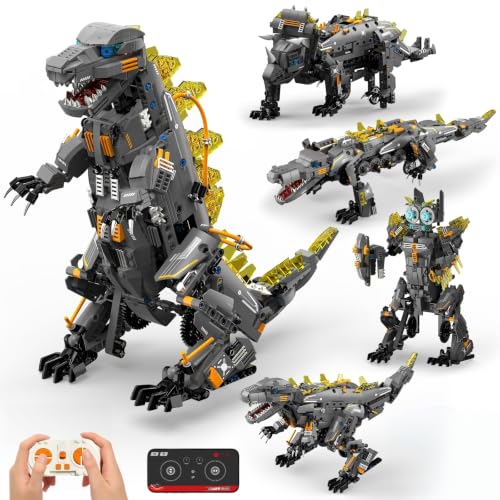
ACIKETO 5 in 1 STEM Robot Kit
What We Like
- 935-piece set for five builds
- App control with coding modes
- Rechargeable battery included
- Movable joints for realistic motion
Trade-offs
- Only one model built at a time
- No lights included on any model
With 935 pieces and five different robot builds, from a Battle Robot to a T-Rex Dino, this kit gives kids plenty of variety without needing a new set each time. The dual-control system, including a 2.4GHz remote and a mobile app with driving simulation, gravity control, and path coding, means they can start with simple play and gradually explore programming concepts. It’s a solid fit for families who want a single set that grows with a child’s interest in STEM, offering hands-on engineering and logic skills through real walking motion and movable joints.
The main catch is that you can only build one model at a time, so if siblings want to play simultaneously, you’ll need to take turns or buy another kit. Compared to the INSOON 5 in 1 Robot Building Toy, which also offers multiple builds with lights, the ACIKETO’s larger piece count gives you more complexity and longer assembly time. For a child who loves dinosaurs and robots and is ready to follow detailed instructions, this kit delivers solid value without needing extra batteries or a separate charger.
Product photos
K'NEX 3-in-1 Amusement Park Set

What We Like
- Battery-powered motor adds motion
- 3 ft tall Ferris wheel centerpiece
- 744 pieces for three different rides
- Encourages problem-solving and spatial awareness
Trade-offs
- No coding or app control included
- 3-foot height requires ample floor space
A 3-foot-tall Ferris wheel that actually spins is the kind of payoff that keeps a 9-year-old at the table past dinner. The included battery-powered motor brings all three rides. Ferris wheel, Swing Ride, and Boom Ride, to life, so you get motion without having to push or crank anything. With 744 pieces, this set gives you enough complexity to challenge a confident builder without overwhelming them. It’s a strong pick for families who want a project that ends in a working display piece, not just a static model.
For builders who want to see a physical structure move and feel the satisfaction of a finished amusement park, this set delivers that in a big, visible way. The 744 pieces let you construct a Ferris wheel, Swing Ride, and Boom Ride, each powered by a battery-driven motor. The Ferris wheel stands three feet tall, so you will need a clear floor or table to let it spin freely. Designed for ages nine and up, the building process encourages problem-solving and spatial awareness. Reviewers note that watching the completed rides operate provides a genuine sense of accomplishment, making the effort well worth it.
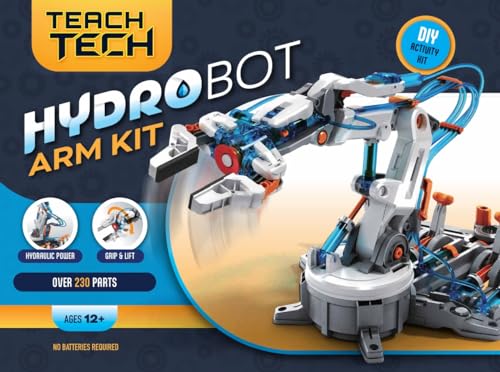
Teach Tech Hydrobot Arm Kit
What We Like
- No batteries required
- 6 axes with 270° rotation
- Includes gripper and suction components
- Develops problem-solving skills
Trade-offs
- Requires multiple hours of assembly
- No battery or charger included
No batteries, no motors, just water pressure. That’s the core idea behind the Hydrobot Arm Kit, and it’s what makes this build genuinely different from every other robot arm on the shelf. The six axes give you real industrial-style articulation, and the 270-degree rotation means it can reach across a desk without you having to move the base. For a kid who’s already built a few motorized kits and wants to understand how fluid power actually works, this is the next logical step. It teaches mechanical engineering through assembly, not through a remote control.
The catch is that you’re trading instant gratification for a deeper lesson. Assembly takes multiple hours, and because there’s no battery, you can’t just flip a switch and watch it go. You have to fill the system, work the levers, and accept that hydraulic action is slower than electric. Compared to something like the Snap Circuits Flight Deck, which snaps together in minutes and launches paper airplanes, the Hydrobot demands patience. It’s not for a child who wants immediate action. But for the one who wants to understand how a real excavator or factory arm moves, this kit delivers that understanding in a way no app-controlled toy can.
Product photos
Suplanet 5 in 1 Robot Building Set

What We Like
- 5 buildable models in one set
- App and remote control included
- Programmable via app for custom moves
- Thick ABS plastic construction
Trade-offs
- Only Bluetooth programming, no onboard coding
- No lights or sound effects included
The app-based programming and remote control let them learn basic coding logic and precise movement control, which is exactly what you want from a tech-focused building toy. It’s a smart pick for the 8-to-12 crowd who want hands-on construction plus real programmable features, all in one box.
The piece count is lower than the ACIKETO 5 in 1 STEM Robot Kit, which has 935 pieces. That means older or more experienced builders might finish the builds quickly and want more challenge. But for the kid just getting into programmable robotics, the Suplanet’s simpler scale and clear app interface make it a less frustrating entry point, and the ABS plastic holds up to the inevitable drops.
Product photos
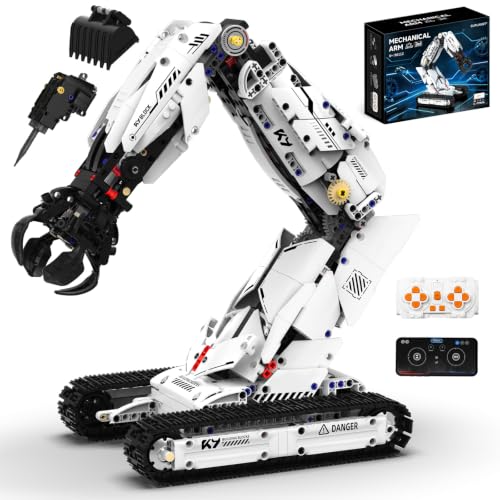
Suplanet 3 in 1 Robot Arm Building Set
What We Like
- Three interchangeable tool heads
- App programming for custom sequences
- Tracked undercarriage for outdoor use
- Remote control included
Trade-offs
- App programming needs a compatible device
- Requires smartphone or tablet for app features
975 pieces and three interchangeable tool heads, gripper, drill, and bucket, let this kit simulate mechanical arm actions, and the precision gear drive system on a tracked undercarriage supports stable climbing and obstacle crossing. That combination makes it a strong fit for kids and teens who want a build that feels like real engineering, with the added bonus of app-based programming for creating custom movement sequences.
With nearly a thousand pieces, this building set is a deliberate, hands-on project that rewards patience and focus rather than a quick assembly. Younger builders may need help or extra time to finish. The kit concentrates on a single robotic arm with a tracked base, unlike the INSOON 5-in-1 which offers more model variations.
Product photos
How We Evaluated Building Toys For Kids With Tech Features
We reviewed each toy’s published specs, build instructions, and component lists, then cross-referenced those details with expert round-ups and patterns in owner feedback from multiple sources. No kit was tested in-house, this is a research-led evaluation designed to save you time.
Three criteria mattered most. First, the tech feature had to genuinely enhance the building experience rather than replace it, app control, coding, or motorized motion should reward the builder for completing the assembly. Second, we looked at build complexity and instructions: a kit that takes hours to assemble needs clear steps and logical part organization. Third, we weighed versatility, meaning how many models or projects a single set supports.
A research-led evaluation has limits. We cannot speak to long-term durability or how a toy holds up after a dozen rebuilds. What we can do is surface the trade-offs that matter, battery life, piece count, age range accuracy, so you walk in knowing what to expect.
We also looked at how these kits connect to broader play patterns. Many of the sets here overlap with interactive building toys that combine physical construction with digital feedback, and several of the coding-focused options are excellent coding toys for a child’s first programming experience.
What To Look For In Building Toys For Kids With Tech Features
The right kit matches a child’s patience level, interest in technology, and desire to rebuild. These four criteria will help you sort through the options.
Look for a tech feature that rewards the build, app control, coding, or motorized motion, rather than one that distracts from it. Match piece count and build time to your child’s attention span.
Type of Tech Feature
The tech in these toys falls into three categories: app or remote control, coding/programming, and motorized motion. App-controlled kits like the INSOON 5 in 1 let kids drive their creation after building it, which adds a strong reward loop. Coding kits such as the Teach Tech Mech-5 teach logic without a screen by using a mechanical coding wheel. Motorized sets like the K’NEX 3-in-1 Amusement Park bring static structures to life with a battery-powered motor. Pick the type that matches what excites your child most.
Build Complexity and Time
Some kits assemble in under an hour; others take multiple sessions. The Snap Circuits 203 Electronics Kit uses snap-together modules with no tools required, making it ideal for quick, repeatable projects. The Teach Tech Hydrobot Arm Kit and the Suplanet 3 in 1 Robot Arm Building Set both require several hours of focused assembly. Check the piece count and the manufacturer’s age recommendation. A kit for ages 12 and up with over 700 pieces is a different experience than a kit for ages 8 and up with a smaller piece count.
Number of Builds Per Set
A single set that builds multiple models offers more long-term play value. The INSOON 5 in 1, ACIKETO 5 in 1 STEM Robot Kit, and Suplanet 5 in 1 Robot Building Set each support five different builds from one box of parts. Single-model kits like the Henoda Robot Building Block Kit deliver a more detailed final robot but cannot be rebuilt into something new. If your child enjoys rebuilding, prioritize multi-model sets.
Power and Battery Requirements
- Check whether batteries are included or need to be purchased separately; the Snap Circuits Flight Deck requires batteries not in the box.
- Look for a rechargeable battery pack if you expect frequent use; the INSOON and ACIKETO kits include one, while the Henoda robot does not include one.
- Consider runtime per charge; the INSOON runs 15–20 minutes, which is short enough that a spare battery or a plan for charging between sessions helps.
- For battery-free play, the Teach Tech Hydrobot Arm uses water pressure instead of electricity, which is a unique option.
A rechargeable battery with at least 30 minutes of runtime is worth paying more for if your child tends to play in long sessions.
Building Toys For Kids With Tech Features Compared
The table below compares all ten kits across the features that matter most: tech type, number of builds, piece count, and power requirements.
| Product | Pieces | Age Range | Control |
|---|---|---|---|
| INSOON 5 in 1 Robot Building Toy | 795 | 8+ | App & Remote |
| Snap Circuits Flight Deck STEM Toy | N/A | 8+ | N/A |
| Teach Tech Mech-5 Coding Robot Kit | N/A | 10+ | Mechanical coding wheel |
| Snap Circuits 203 Electronics Kit | N/A | 8+ | N/A |
| Henoda Robot Building Block Kit | 468+ | 8-16 years | APP or Remote Control |
| ACIKETO 5 in 1 STEM Robot Kit | 935 | 8-14+ | App & Remote |
| K'NEX 3-in-1 Amusement Park Set | 744 | 9+ | N/A |
| Teach Tech Hydrobot Arm Kit | N/A | 12+ | N/A |
| Suplanet 5 in 1 Robot Building Set | N/A | 8-14 | RC & App |
| Suplanet 3 in 1 Robot Arm Building Set | 975 | 8-14 | Remote & App |
Frequently Asked Questions
What age is appropriate for building toys with tech features?
Most kits in this guide target ages 8 and up. The Teach Tech Hydrobot Arm Kit and the Suplanet 3 in 1 Robot Arm Building Set are recommended for ages 12 and up due to their detailed assembly. Always check the manufacturer’s age rating and consider your child’s prior building experience.
Do these toys require a smartphone or tablet?
Some do. The INSOON 5 in 1, ACIKETO 5 in 1, and both Suplanet kits use app control or programming that requires a compatible smartphone or tablet. The Teach Tech Mech-5 and the Snap Circuits kits work entirely without a screen, which is a plus for parents limiting device time.
Can kids learn coding from building toys?
Yes, several kits introduce coding concepts. The Teach Tech Mech-5 uses a mechanical coding wheel to teach logic without a screen. The ACIKETO and Suplanet kits offer app-based programming where kids drag and drop commands to create custom move sequences. These are excellent toys that teach coding fundamentals in a hands-on way.
How long does it take to build these kits?
Build time varies widely. Snap Circuits projects take minutes to snap together. The K’NEX 3-in-1 Amusement Park and the Teach Tech Hydrobot Arm can take several hours over multiple sessions. The 5-in-1 kits typically require 2-4 hours for a single model, depending on the child’s age and experience.
What is the difference between app control and coding?
App control lets a child drive or steer the robot in real time using a phone or tablet as a remote. Coding requires the child to program a sequence of commands, move forward, turn, grab, that the robot executes autonomously. Some kits, like the ACIKETO 5 in 1, offer both modes in one set.
The Bottom Line
The INSOON 5 in 1 Robot Building Toy is the best overall pick for kids who want speed, variety, and dual control options in one kit. Its five build options and 680 RPM motor make it the most versatile tech-forward building set in this lineup, though the 15-20 minute runtime means you will want a charging plan.
If your child prefers screen-free coding logic, the Teach Tech Mech-5 Coding Robot Kit delivers a patient, methodical building experience that teaches real programming concepts. For the youngest builders or those who love quick, repeatable projects, the Snap Circuits 203 Electronics Kit offers 200+ projects with no tools and no app required.
The single most important factor is matching the tech feature to your child’s play style. A kid who loves driving remote-control cars will thrive with an app-controlled robot kit, while a future engineer will enjoy the hydraulic mechanics of a battery-free arm. Choose the tech that rewards the build, not one that replaces it.
